
.webp)

.svg)
How to create a small business website in the UK
A professional small-business website can be live within days using an all-in-one builder, or within a few weeks if you go the WordPress or agency route. For most UK small businesses starting out, an all-in-one builder is the fastest and most affordable option. If you need bespoke design, complex integrations, or a site that doubles as a long-term marketing asset, hiring an agency is the smarter call.
Your immediate next step: work through the checklist below, starting with two decisions — what your site needs to do, and what domain name you want.
- Fastest route: all-in-one website builder (days to launch, low monthly cost)
- Most flexible DIY route: self-hosted WordPress (one to three weeks, more setup required)
- Best for growth and bespoke needs: hire a web design agency
Key takeaways
A focused, well-built small-business website with a single clear call to action will outperform a large, unfocused one every time — regardless of which route you take to build it.
| Point | Details |
|---|---|
| Choose your route by budget and complexity | Builders suit simple sites under £40/month; agencies suit bespoke or growth-focused needs. |
| Plan payments and bookings first | These requirements determine your platform choice before anything else. |
| Keep the site compact | Five to seven focused pages with one primary call to action outperforms a sprawling site. |
| Cover UK legal requirements | Publish a privacy policy, cookie notice, and business contact details before going live. |
| Hook-digital for managed builds | Hook-digital handles design, development, SEO basics, and optional ongoing retainers for Oxfordshire businesses and beyond. |
Useful UK resources
- nibusinessinfo — Set up a small business website: practical steps and consumer-notice requirements for UK businesses
- nidirect: official UK government guidance on legal and registration requirements
- Forbes UK — How to make a website for your small business: stepwise how-to covering strategy, domain registration, and content priorities
- Stripe — How to create a website for a small business: guidance on payment planning and platform selection
- Leadpages — Website cost guide: cost benchmarking for DIY, freelance, and agency builds
Table of Contents
- How to create a small business website: the step-by-step build checklist
- Which approach suits you: builder, WordPress, or agency?
- What features does every UK small-business site need?
- Realistic UK costs and how long each approach takes
- Which tools and services will you actually need?
- Should you DIY or hire an agency? A practical decision checklist
- Hook-digital’s approach to small-business websites
- What Hook-digital can do for your website
- Sources
- FAQ
How to create a small business website: the step-by-step build checklist
Follow this sequence from planning to launch. Most steps take less than an hour each if you know what you are doing before you start.
Phase 1: Plan before you build
- Define your site’s primary goal. Is it to generate enquiries, sell products, take bookings, or simply confirm you exist? One goal, one primary call to action. Most small businesses perform best with a focused five-to-seven page site rather than a sprawling one.
- Choose your site type. Brochure site (services, contact), online store (products, checkout), or booking site (appointments, classes). Matching the site type to your business goal shapes every decision that follows — platform, features, and budget. VistaPrint’s breakdown of website types is a useful reference if you are unsure which category fits.
- Decide on payments and bookings now. Stripe recommends settling payment and booking requirements at the planning stage because these needs determine which platform you can realistically use and how complex your integrations will be.
- Register your domain name. Choose a
.co.ukfor a UK-focused business or.comfor broader reach. Keep it short, easy to spell, and close to your business name. Registrars such as 123 Reg, Namecheap, and GoDaddy all operate in the UK. - Pick your platform or brief an agency. See the comparison section below for decision criteria.
- Choose a template or theme. Pick one that suits your industry and is mobile-responsive out of the box. Resist the urge to customise everything on day one — get the structure right first.
- Write and add your core pages. Home, services or products, about, contact, privacy policy, and cookie notice. Forbes UK’s guidance stresses that your homepage and service pages need a single, clearly visible call to action — not three competing ones.
- Set up payments or bookings if your site type requires them. Test every transaction flow before going live.
- Install analytics. Google Analytics 4 is free and gives you traffic, source, and behaviour data from day one.
- Add SEO basics. Set a unique page title and meta description for each page. Use your location and service in the homepage title (e.g. “Plumber in Oxford — Fast, Reliable Call-Outs”).
Pro Tip: Write your homepage headline before you choose your template. If you can state what you do, who you do it for, and why someone should choose you in two sentences, the rest of the copy becomes much easier to write.
Phase 2: Pre-launch checklist
Run through every item below before you point your domain at the live site.
- All internal links work and go to the right pages
- Contact form submits correctly and you receive the test message
- SSL certificate is active (your URL shows
https://) - Site loads on mobile without broken layouts or cut-off text
- Cookie consent banner is live and compliant with UK GDPR requirements
- Privacy policy and terms of service pages are published
- Business name, address, and contact details are visible (legally required for UK businesses)
- Google Analytics is tracking and Google Search Console is set up
- Page speed is acceptable (use Google PageSpeed Insights to check)
- Images are compressed so they do not slow the page down
Which approach suits you: builder, WordPress, or agency?
The right choice depends on your budget, your technical comfort, and what you need the site to do long-term. Here is an honest breakdown.
All-in-one builders
Platforms in this category let you drag, drop, and publish without touching code. They handle hosting, security, and updates automatically. Template-based builders are well suited to brochure sites and small shops that prioritise speed over deep customisation. The trade-off is that you are working within the platform’s constraints — moving to a different platform later can be awkward.

Free plans exist on several builders, but free site makers typically require a paid upgrade for a custom domain, professional email, and e-commerce features. Budget for a paid plan from the start if you want a credible, professional result.
Self-hosted WordPress
WordPress powers a significant share of the web and gives you genuine flexibility. You can install almost any plugin, customise your theme deeply, and own your data entirely. The catch is that you are responsible for hosting, updates, backups, and security. It takes longer to set up than a builder and requires more ongoing attention. For a business owner who wants full control and is comfortable with a modest learning curve, it is a strong choice.

Hiring an agency
An agency handles strategy, design, development, content, and launch — and can manage the site afterwards on a retainer. The cost is higher upfront, but the output is bespoke, tested, and built around your business goals rather than a template. For businesses with complex integrations, strict compliance needs, or high-volume e-commerce, this is often the lower-risk path.
Decision criteria at a glance:
- Budget under £50/month, simple site: builder
- Budget flexible, want full control: WordPress
- Need bespoke design, integrations, or ongoing marketing: agency
| Dimension | All-in-one builder | Self-hosted WordPress | Agency build |
|---|---|---|---|
| Best for | Brochure sites, simple shops | Flexible sites, blogs, content-heavy | Bespoke, complex, growth-focused |
| Typical cost shape | Low monthly subscription | Hosting + theme + plugins (monthly) | One-off project fee, optional retainer |
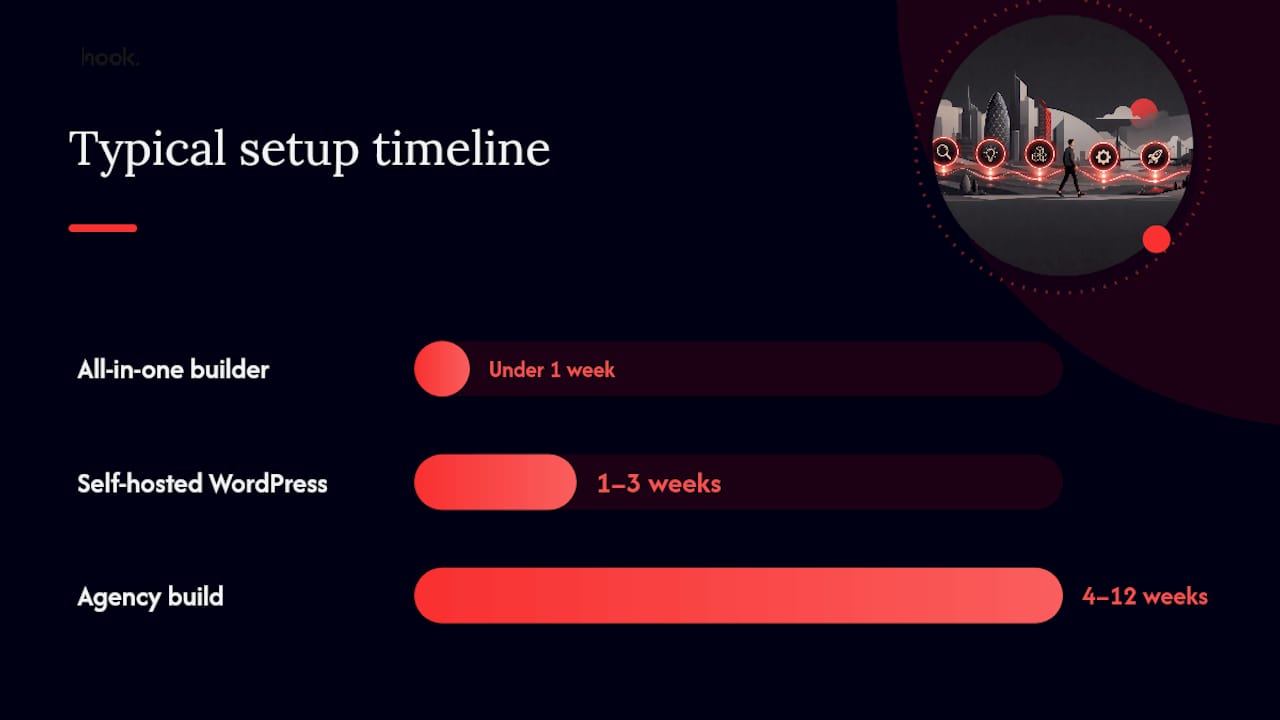
| Setup time | Hours to a few days | One to three weeks | Four to twelve weeks depending on scope |
| Built-in features | Ecommerce, forms, basic SEO | Via plugins (vast ecosystem) | Custom-built to brief |
| Scalability | Limited by platform | High, with effort | High, managed for you |
| Support and maintenance | Platform support included | Self-managed or paid support | Managed by agency |
Timeline vs cost summary: A builder site can go live in under a week. A WordPress build typically takes one to three weeks. An agency project runs four weeks at the short end and several months for a complex brief.
What features does every UK small-business site need?
A credible, useful site for a UK small business covers three layers: content, function, and legal compliance.
Core content
- Homepage with one clear call to action (phone number, booking link, or contact form — pick one as the primary)
- Services or products pages with specific descriptions, pricing where possible, and what makes you different
- About page that shows the people behind the business — this builds trust faster than almost anything else
- Contact page with a click-to-call phone number, email, address, and an embedded map if you have a physical location
- Testimonials or reviews visible on the homepage or a dedicated page — social proof matters
Good branding runs through every page: consistent colours, fonts, and tone of voice signal that you are a professional operation.
Functional features
- SSL certificate (non-negotiable — browsers flag non-HTTPS sites as insecure)
- Responsive, mobile-friendly design
- Fast hosting with reliable uptime
- Contact form with spam protection (reCAPTCHA or equivalent)
- Basic on-page SEO (unique titles, meta descriptions, alt text on images)
- Google Analytics 4 for traffic data
- Payment gateway or booking integration where your site type requires it — ecommerce-first builders shift the burden of payments, tax, and checkout security to the platform, which is efficient for merchants starting out
Legal requirements for UK businesses
UK law requires certain information to be visible on your site. Official UK guidance and nibusinessinfo both confirm that UK businesses must publish clear contact details, a privacy policy, and a cookie notice with genuine consent options. If you are a limited company, your Companies House registration number and registered address are also required.
- Privacy policy (required under UK GDPR)
- Cookie consent notice with the ability to accept or decline non-essential cookies
- Terms of service (recommended for any site taking payments or bookings)
- Business name, address, and contact information
- Company registration number and registered office if you are a limited company
Pro Tip: Don’t leave legal pages until the last minute. A free privacy policy generator can produce a working draft in minutes, but have a solicitor review it if your site collects sensitive data or processes payments.
Realistic UK costs and how long each approach takes
According to Leadpages’ cost benchmarking, small-business website costs vary considerably depending on the route you choose.
Typical UK cost bands:
- DIY builder: roughly £10–£40 per month on a paid plan, depending on the platform and features needed
- Freelance designer/developer: a one-off fee typically ranging from a few hundred to a few thousand pounds, depending on scope and experience
- Agency project: one-off fees generally start from several thousand pounds for a focused small-business site; complex builds or those with ongoing retainers sit higher
What those costs usually include:
- Domain registration: around £10–£15 per year for a
.co.uk - Hosting: included in builder plans; separate for WordPress (roughly £5–£20/month for shared hosting)
- Theme or template: free to £100+ one-off for WordPress; included in builder subscriptions
- Plugins or extensions: free tiers available, premium plugins typically £30–£100/year each
- Payment processing fees: Stripe and similar gateways charge a percentage per transaction (check current UK rates on their sites)
- Optional photography or brand design: variable, but professional photography meaningfully improves conversion rates
Timeline summary:
- Builder site: a few hours to a few days for a simple brochure site
- WordPress or freelance: one to three weeks
- Agency build: four to twelve weeks, depending on scope and how quickly you can supply content and feedback
Which tools and services will you actually need?
You do not need every tool on the market. You need one solid choice from each category below.
Categories and what to look for
- Domain registrar: 123 Reg, Namecheap, or GoDaddy. Check renewal pricing, not just the first-year offer.
- Hosting provider: Look for UK-based servers (better speed for UK visitors), daily backups, and clear uptime guarantees. SiteGround and Krystal Hosting are well-regarded UK-friendly options.
- Website builder or CMS: Match to your site type. Builders for speed; WordPress for flexibility.
- Payment gateway: Stripe and PayPal both operate fully in the UK and handle VAT calculations. Check transaction fees before committing.
- Booking system: Calendly, Acuity Scheduling, and Fresha (for beauty and wellness) all integrate with most platforms.
- Email marketing: Mailchimp and Brevo (formerly Sendinblue) both offer free tiers and are GDPR-compliant.
- Analytics: Google Analytics 4 is free and sufficient for most small businesses.
- Image and asset tools: Canva for graphics, Unsplash or Pexels for free stock photography, TinyPNG for image compression.
For a broader view of marketing tools for small business owners, Hook-digital has a dedicated guide covering the full toolkit.
Red flags when choosing tools
- No SSL included by default
- Pricing that is unclear or changes significantly after the first year
- No UK-based support or support hours that do not cover your working day
- No automatic backups or backup restore process
- Data stored outside the UK/EEA with no data processing agreement available
Should you DIY or hire an agency? A practical decision checklist
Work through these questions honestly before committing to either route.
- What is your realistic budget? Under £500 total points toward a builder. Over £2,000 opens the door to a freelancer or small agency.
- How much time can you give this? Building a site yourself takes time — not just the initial build, but ongoing updates. If your time is better spent running the business, outsourcing makes financial sense.
- Do you need custom integrations? CRM connections, bespoke booking logic, or complex e-commerce setups are difficult to do well on a standard builder.
- How important is the site to your revenue? If the website is your primary sales channel, the cost of a poorly built site is higher than the cost of hiring someone to do it properly.
- Do you want to own and manage the site yourself long-term? If yes, a builder or WordPress with a good theme is manageable. If not, an agency retainer may suit you better.
- Are there compliance requirements? Regulated industries (financial services, healthcare, legal) need more careful handling of data, disclaimers, and legal pages.
Red flags that make DIY a risky choice:
- You need to connect the site to a CRM, ERP, or bespoke stock system
- You are processing high volumes of transactions and need PCI compliance beyond what a standard gateway provides
- Your industry has strict advertising or data rules (financial services, medical)
- You have no time to learn the platform and no one in-house who does
Questions to ask an agency or freelancer before hiring
- What are the delivery milestones and when will I see the first draft?
- Who is responsible for hosting and ongoing maintenance after launch?
- What happens if I want to make changes — is there a cost per change or a monthly allowance?
- Are SEO basics (page titles, meta descriptions, sitemap) included in the project?
- Will I own the domain, hosting account, and all site files at the end?
- What does handover look like — will you train me to update the site myself?
Hook-digital’s approach to small-business websites
At Hook-digital, we treat every small-business website project as a conversion problem first and a design problem second. A site that looks good but does not generate enquiries has not done its job.
Our process starts with a focused discovery conversation — usually an hour — where we establish what the site needs to achieve, who the audience is, and what the primary call to action should be. From there, we work on a compact page set (typically five to seven pages) with design and content prioritised around that single goal. We test on mobile and desktop before launch, and we offer a monitored handover so you are not left guessing whether everything is working.
For clients who want ongoing support, we offer retainer options that cover updates, SEO, and wider digital marketing packages — so the site keeps working as your business grows. We are based in Oxford and work with businesses across Oxfordshire and beyond.
What Hook-digital can do for your website
If you would rather hand this over to a team that has done it before, Hook-digital builds small-business websites that are designed to convert, not just to look the part.
Here is what a typical project includes: a scoping session to nail down your goals, professional design aligned with your brand, development on a platform that suits your needs, SEO basics built in from the start, and a clear handover so you know how to manage the site going forward. Optional retainers cover ongoing updates, Google Ads, SEO, and social media management — all under one roof, with one point of contact.
Take a look at our branding and design work to get a sense of what we produce, or visit our Oxford marketing agency page to find out more about working with us locally. When you are ready, get in touch for a no-pressure conversation about what your site needs.
Sources
FAQ
How do I create a website for my small business for free?
Free plans on builders such as Canva or Wix let you publish a basic site quickly, but you will need a paid plan for a custom domain, professional email, and e-commerce features. Free plans are useful for testing an idea, not for a permanent business presence.
Can ChatGPT actually build a website for me?
ChatGPT can help you write copy, draft page structures, and generate ideas, but it cannot build or host a website on its own. You still need a platform (a builder, WordPress, or an agency) to create and publish the actual site. AI tools are useful for speeding up content creation once you have the platform in place — Hook-digital’s guide on AI for small business marketing covers this in more detail.
How much does it cost to set up a website for a small business in the UK?
DIY builders typically cost £10–£40 per month on a paid plan. A freelance build usually runs from a few hundred to a few thousand pounds as a one-off. Agency projects for small businesses generally start from several thousand pounds, with optional ongoing retainers on top. Domain registration adds around £10–£15 per year for a .co.uk.
Is it worth making a website for a small business?
Yes. A website gives you a credible, always-on presence that works while you are not — taking enquiries, showcasing your work, and building trust with potential customers before they ever speak to you. For most UK small businesses, it is one of the highest-return investments in their marketing strategy.
Recommended
- Best digital marketing packages for small businesses | Hook Digital - Oxford’s Premier Full-Service Marketing Agency
- Versantus.co.uk alternatives for UK businesses: 2026 guide | Hook Digital - Oxford’s Premier Full-Service Marketing Agency
- Website Design & Development Oxford | Conversion-Led Web Builds | Hook Digital
- Best brand identity packages for small business: what to choose | Hook Digital - Oxford’s Premier Full-Service Marketing Agency
.png)


