



CRM Integration for Marketing: How to Connect Your Tools
CRM integration for marketing means connecting your customer relationship management system to your email, website, social, advertising and finance tools, so customer data moves between them automatically. Done well, your marketing team stops re-typing contacts, sales sees which campaigns a lead responded to, and automated messages go to the right people at the right time. Done badly, you get duplicate records, mistimed emails and compliance headaches. This guide covers what to connect, how to set it up, how to keep it lawful in the UK and how to choose a CRM that will not box you in.
TL;DR
- CRM integration links your CRM with other software so that an action in one tool updates the data in the others, with no copying between systems.
- Marketing automation uses that shared data to send timely, relevant messages, and to pass warm leads to sales with the right context.
- In the UK, any email marketing driven by your CRM needs valid consent or a qualifying exception under PECR, plus accurate records and honoured opt-outs.
- Start with the tools you already use and the questions you want answered, then choose the CRM, not the other way round.
- Audit your data before you connect anything. Bad data synced faster is still bad data.
Table of Contents
- What CRM integration actually means
- Which tools and data to connect
- How marketing automation uses your CRM
- Keeping CRM data lawful in the UK
- Risks of integration and how to manage them
- Choosing a CRM for marketing automation
- A simple integration plan for your first 90 days
- Our perspective
- How Hook Digital can help
- FAQ
- Sources
What CRM integration actually means
A CRM stores customer data and interactions, giving you what VisitScotland’s business support team describes as a single view of how people engage with your business across the customer journey. On its own, though, a CRM only knows what someone types into it.
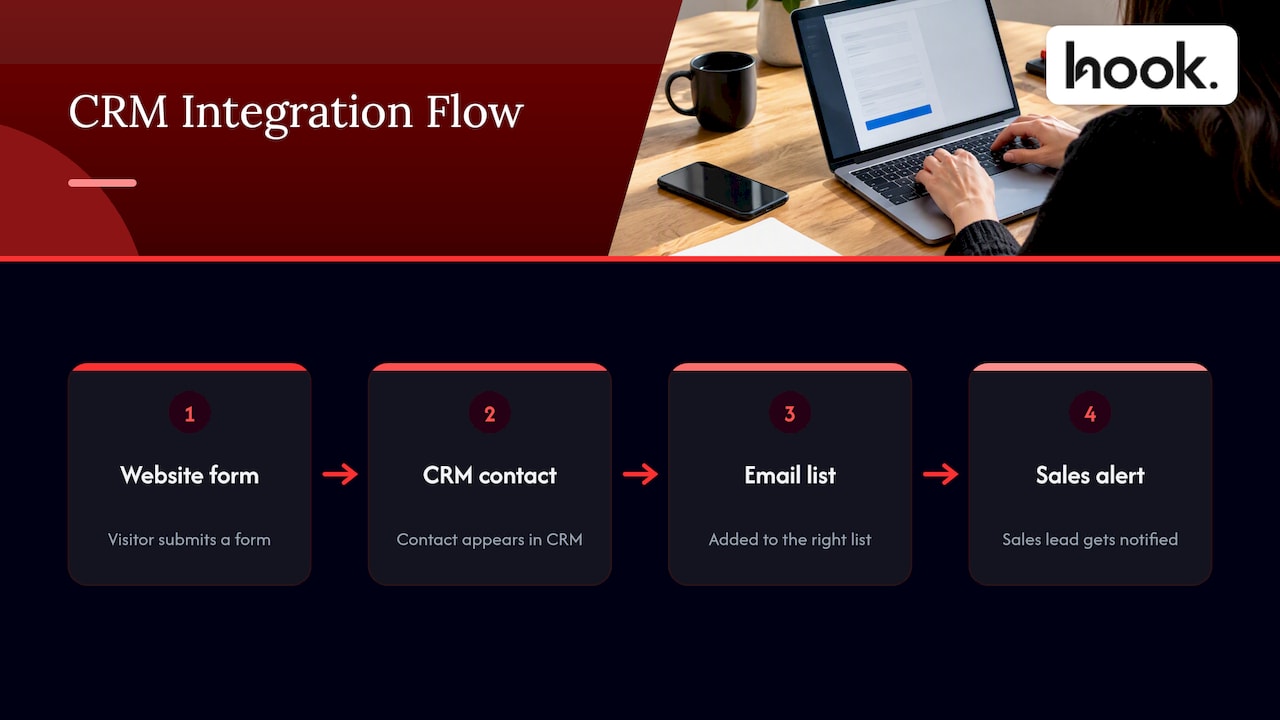
Integration changes that. Zendesk UK defines CRM integration as connecting a CRM with other software so that an action in one integrated application automatically affects data in the others, which cuts down switching between systems. In practice: a visitor fills in a form on your website, the contact appears in your CRM, the email platform adds them to the right list, and your sales lead gets a notification. Nobody touched a spreadsheet.
For marketers, the point is simple. CRM data from sales and customer-service systems helps you judge which inbound lead-generation tactics are working and use real customer behaviour to shape future campaigns. Without that link, you are guessing which channel produced the customer who actually paid.
Which tools and data to connect
You do not need to connect everything on day one. According to NetSuite’s overview, common CRM integrations cover email marketing, social media, website analytics, ecommerce, accounting and ERP systems, and the synced data can include customer and order information, lead scores and campaign performance.
Here is how we would prioritise them for a typical Oxfordshire business with a small marketing team.
| Connection | What flows between systems | What it lets marketing do |
|---|---|---|
| Website forms and landing pages | New enquiries, source of the visit, pages viewed | Know which pages and campaigns create leads |
| Email marketing platform | Contacts, list membership, email engagement | Segment audiences and trigger follow-ups |
| Paid advertising (Google Ads, paid social) | Lead source, campaign, conversion status | Judge ads on revenue, not just clicks |
| Organic social | Enquiries and conversations from social channels | Link social activity to real opportunities |
| Ecommerce or booking system | Orders, purchase history | Build repeat-purchase and win-back campaigns |
| Accounting software | Invoices, payment status | Stop chasing marketing messages to customers who owe money |
Enable Services notes that CRM and marketing integration can synchronise contacts, leads, campaign activity, email engagement, forms, customer information and custom fields, which reduces manual administration and keeps data current. That last point matters more than it sounds. A phone number corrected by your sales team should be corrected everywhere, not in one place.
Shopify UK describes the goal as a real-time, unified view of the customer journey, with examples such as order history, billing, support conversations, marketing data and social activity. If you can see those on one record, you can stop sending a discount code to someone who raised a complaint yesterday.
How marketing automation uses your CRM
Marketing automation is software that sends messages, assigns tasks and scores leads according to rules you set. It is only as smart as the data behind it. Martech.org explains that automation uses CRM data to trigger personalised, timely messages based on customer behaviour, and that integration can improve lead management and help marketers track campaign ROI.
Three workflows show what that looks like.
Lead nurturing and handover
A new lead downloads a guide. The CRM records it, the automation sends a short sequence of useful emails, and when the contact visits your pricing page several times, the system flags them for a sales call. Integrating the two systems helps move lead data between sales and marketing so leads are nurtured and receive the correct follow-up.
The sales team then calls with context: what the person read, what they clicked, what they asked for. That is far more persuasive than a cold “just checking in”.
Stopping campaigns at the right moment
One of the most practical benefits is knowing when to stop. Zoho’s integration documentation notes that the two systems can share contact data and interaction history, and that campaigns can stop once a deal opens. Nobody wants a promotional sequence landing in the inbox of a prospect who is halfway through contract negotiations.
This is where sales and marketing coordination matters. If your teams work from different views of the same lead, irrelevant messages follow. Sales engagement tools built to coordinate outreach, such as sales outreach platforms with CRM integrations, show the same principle at work: one shared pipeline, so nobody contacts a buyer twice with different messages. We cover the human side of this in our guide on how to align marketing and sales teams.
Personalisation and segmentation
HubSpot’s guidance says a CRM connected to marketing channels can help you personalise messages, create more targeted content and optimise campaigns. Segmentation is the simplest place to begin: past customers, active prospects, lapsed enquiries and event attendees each need a different message. Our guide to types of lead generation tactics will help you decide which sources should feed those segments.
Keeping CRM data lawful in the UK
Integration multiplies the places personal data lives, so compliance has to be designed in from the start. The ICO’s guidance on planning direct marketing says UK organisations should plan direct marketing for both data protection and PECR (the Privacy and Electronic Communications Regulations), give people the required privacy information, keep information accurate, and respect consent withdrawals and opt-outs.
Two points to build into your setup:
- Consent for email. The ICO states that PECR requires consent for electronic mail marketing to individual subscribers unless a soft opt-in exception applies, and that consent must be specific, informed and unambiguous. Your forms, and the way your CRM records consent, need to reflect that.
- Opt-outs travel. When someone unsubscribes in your email platform, that status must reach the CRM and every other connected tool. Otherwise a sales sequence or an ad audience can contact them again.
A practical routine: record the consent wording, date and source on each contact record, sync the unsubscribe field both ways, and review who has access. Cookie and tracking consent on your website feeds your analytics and ad data too, so it belongs in the same plan. Our GDPR cookie consent checklist walks through that side. For specific legal questions about your own data practices, speak to a data protection adviser or solicitor rather than relying on a general guide.
Risks of integration and how to manage them
Integration is not a magic switch. Martech.org lists the main risks as inconsistent data, complex integrations, security and compliance issues, costs and scalability, and says they are best addressed by investing in data quality and integration and by monitoring performance. It adds that problems are most likely when systems use different data structures or APIs.
Here is how we handle each one in practice:
- Clean before you connect. Merge duplicates, standardise fields (job titles, company names, sources) and delete records you have no lawful reason to keep.
- Agree one source of truth. Decide which system owns each field. If the CRM owns phone numbers and the email platform owns subscription status, write that down.
- Start small. Connect forms, CRM and email first. Add advertising and ecommerce once the first link behaves.
- Test with dummy contacts. Submit a form, unsubscribe, change a field, and watch what happens in each tool.
- Monitor monthly. Check for sync errors, bounced emails, orphan records and drops in form-to-CRM matches.
- Document it. Keep a simple map of what connects to what, who set it up and who has admin rights. When someone leaves, nothing should break.
This ties directly to your wider tool choices. Before you add anything new, it is worth running the audit we describe in our marketing tech stack guide, which looks at what you already own first.
Choosing a CRM for marketing automation
Most searches here ask which CRM is best for small businesses in the UK. There is no single answer, because the right choice depends on your sales process, your team size and the tools you already use. What you can do is judge any option against criteria that matter.
Integration depth
Ask what connects natively and what needs a third-party connector. For example, Zoho says its CRM offers over 1,100 ready-to-use integrations, alongside no-code automation and customisable layouts for sales, service or marketing. A big marketplace is useful, but check that the specific tools you use are on it, and how well they work.
For UK finance workflows, one UK review site advises looking for native or app-store links to accounting packages like Xero and Sage so invoices and contacts stay in sync, noting that native links beat fragile connector chains.
Marketing features built in or bolted on
Some platforms bring marketing, sales, service, content tools and customer data together on a single platform, while others focus on the CRM and rely on add-ons. All-in-one options reduce integration work. Specialist combinations can be more flexible. If you only send newsletters and run a few automated sequences, an email platform with a built-in sales CRM may be enough. If you run multi-channel campaigns with a sales team, you will want deeper automation and reporting.
Price, in pounds, and how it scales
Pricing usually rises per user and per feature tier. As one published example, Salesforce’s UK pricing page lists Starter Suite from £20 per user per month and Pro Suite from £80, the latter with annual billing and a contract required. Prices change, so always check the vendor’s own page. Whatever you pick, model the cost at the team size you expect in two years, and ask what happens to your data if you leave.
UK data and compliance
A UK CRM buying guide suggests small businesses weigh UK or EU data residency, integrations with accounting software and pricing in pounds. Ask any vendor where data is stored, how consent is recorded, and how easily you can export or delete a person’s records on request.
Usability
A CRM nobody updates is worse than no CRM. Ask the people who will use it daily to trial it with real tasks. If logging a call takes more than a minute, adoption will suffer, and your integrations will be fed incomplete data.
A simple integration plan for your first 90 days
If you are starting from a spreadsheet or a lightly used CRM, this order works for most business owners and marketing managers.
- Weeks 1 to 2: define the questions. Which campaigns produce customers? How long do leads take to convert? Where do we lose people? Your integration should answer these.
- Weeks 2 to 4: audit and clean. List your tools, data fields and consent records. Remove duplicates and decide field ownership.
- Weeks 4 to 6: connect the core. Website forms, CRM and email platform, with consent and unsubscribe syncing both ways.
- Weeks 6 to 9: add automation. A welcome sequence, a lead-scoring rule and a sales alert. Three working workflows beat fifteen half-built ones.
- Weeks 9 to 12: connect advertising and reporting. Feed lead status back to your ad platforms so they optimise for qualified leads. Our piece on B2B Google Ads that deliver pipeline shows why that matters.
- Ongoing: review monthly. Check data quality, sync errors and whether the reports are being used to make decisions.
If you want a broader view of the software you might connect, our 2026 guide to marketing tools for small business owners is a good companion.
Our perspective
Most of the CRM problems we see are not software problems. They are coordination problems. The website was built by one team, the ads are run by another, social sits with a freelancer, and the CRM is something the sales team set up years ago. Each does a decent job, but nobody owns the thread that connects a click to a customer.
That is why we built Hook around one team. When the people designing your website, running your Google Ads and managing your social channels also work from the same lead data, integration stops being a technical project and becomes how marketing simply works. Forms are built to feed the CRM properly. Campaign tracking is set up before the ads go live. Amends to content and websites are turned around within 48 hours, so a fix to a broken form does not sit in a queue for weeks.
We also scope work around what you actually need, with no forced packages, and give you a client portal so you can see progress and talk to us directly. For a business owner or marketing manager in Oxfordshire, that means one conversation instead of four, and a CRM that does the job you bought it for.
Hook
How Hook Digital can help
If you would rather not coordinate website developers, ad managers and content creators yourself, our full service marketing team can plan and run the whole thing, from the forms and landing pages that feed your CRM to the campaigns that bring people in.

If your first priority is the website side, such as lead forms, tracking and speed, see our website design and SEO services. If you want advertising that reports on real leads rather than clicks, our social media and PPC management covers Google Ads, paid social and retargeting. Tell us what tools you already use, and we will scope only what you need.
FAQ
What is the role of a CRM in marketing?
A CRM gives marketing one place to see who your contacts are and how they have interacted with your business. That lets you segment audiences, personalise messages and judge which campaigns lead to real customers. Connected to your other tools, it also keeps that picture up to date automatically.
What is marketing automation integration?
It is the link between your CRM and your marketing automation platform, so contact data, lead scores and activity pass between them. Automated emails can then react to what people actually do, and sales receives leads with context. It also lets campaigns pause when a deal opens.
Which CRM is best for a small UK business?
There is no universal best. Compare options on native integrations with the tools you already use, how much marketing automation is built in, pricing in pounds at your future team size, and where data is stored. Trial two or three with real tasks before you commit.
Do I need consent to email contacts from my CRM?
In most cases, yes. The ICO says PECR requires consent for electronic mail marketing to individual subscribers unless a soft opt-in exception applies, and that consent must be specific, informed and unambiguous. Record how and when consent was given, and make sure opt-outs sync to every connected tool. For your specific situation, check with a data protection adviser.
How long does CRM integration take?
It depends on how clean your data is and how many tools you connect. A basic link between website forms, CRM and email can be set up quickly, while advertising, ecommerce and finance connections add time. Phasing the work over roughly a quarter, as outlined above, keeps it manageable and testable.
Sources
- VisitScotland Business Support: Customer relationship management systems
- Zendesk UK: CRM Integration Basics
- NetSuite: What Is CRM Integration?
- Enable Services: CRM and Marketing Integrations
- Shopify UK: CRM Integration
- Martech.org: CRM and marketing automation challenges and benefits
- Zoho: Marketing automation and CRM integration
- HubSpot: How to Use Your CRM to Power Your Marketing
- ICO: Plan direct marketing
- Zoho CRM UK
- CRM Reviews UK: Best CRM Software UK
- Salesforce UK: CRM Pricing Plans
- Worktual: Best CRM for Small Business UK


