

.webp)

.svg)
Marketing Tech Stack: Audit First, Then Weigh AI and Composable Design

A good marketing tech stack connects your customer data to the channels you use to reach people and the dashboards that tell you what worked, without forcing your team to copy and paste between fifteen tabs. If you’re not sure your stack does that, the fastest way to find out is a short audit of what you own, what gets used, and where the data actually flows. Start there before you buy anything new.
TL;DR:
- Record each tool’s owner, licence cost, renewal date, usage during the past 90 days, integrations, and intended outcome, including tools purchased outside procurement.
- Check APIs, agreed event definitions, reliable customer matching, and data speed before adopting a composable warehouse; its flexibility requires governance and a named integration owner.
- The 2025 survey reported AI tool adoption at 68.6%, so test features in existing software before paying for a broad platform migration.
- Review spending and usage quarterly, run a full audit annually, and involve tool owners, budget holders, and data leads to prevent decisions from being reversed.
- For migrations involving customer data or billing, run old and new systems in parallel, then check adoption against goals 60 to 90 days after launch.
Table of Contents
- What a marketing tech stack actually means
- How to audit your current stack: a step-by-step checklist
- Core categories and roles in a modern martech stack
- Integration, data architecture and composability: where to focus technical effort
- Trends that should influence your stack decisions
- How to choose what to keep, replace or build
- How agencies approach stack reviews for busy marketing leaders
- Best practices for selecting marketing technology vendors and tools
- Change management and team training when updating your stack
- Examples of stack configurations by business type and size
- Key criteria for evaluating martech solutions
- One practical starter plan for busy marketing leaders
- How Hook Digital can help build and run your marketing technology stack
- FAQ
- Sources
What a marketing tech stack actually means
“Marketing tech stack” (often shortened to martech or just “the stack”) describes every tool your marketing team uses to plan, create, publish, measure and optimise campaigns, from your CRM to your email platform to the dashboard your boss checks on Monday mornings. It matters more now than it did five years ago because customers expect personalised messages, budgets are tighter, and generative AI has changed what a lean team can realistically produce.
A healthy stack earns its keep in three ways:
- Fewer manual handoffs: data moves between tools automatically instead of through spreadsheets and exports.
- Better targeting: you can act on what you know about a customer in real time, not three days later.
- Clearer attribution: you can say which channel, campaign or piece of content actually drove a result.
If your stack isn’t doing at least two of those three things, that’s the gap an audit will expose.
How to audit your current stack: a step-by-step checklist
Most teams don’t have a martech problem so much as a visibility problem: nobody has looked at the full list of tools, owners and costs in one place for a year or more. A short audit fixes that.
- List every tool in use, including shadow IT bought on a company card without procurement’s knowledge.
- Record the owner, licence cost and renewal date for each one.
- Pull usage data: logins, active seats, campaigns sent or records touched in the last 90 days.
- Map how data flows between tools, noting where integrations exist and where someone manually exports a CSV instead.
- Flag overlaps, where two tools do substantially the same job for different teams.
- Sort each tool into keep, consolidate, replace or build, based on usage, cost and how well it fits where the stack is heading.
Pro Tip: Capture six fields per tool, category, owner, licence cost, monthly active users, integrations and the business outcome it’s meant to drive, and prioritisation becomes a sorting exercise rather than a debate.
Core categories and roles in a modern martech stack
Every stack, however small, tends to need the same handful of categories, even if one tool covers two of them.
- CRM: the system of record for contacts, accounts and deal or lifecycle stage.
- CMS: where your website content and landing pages live and get published.
- Analytics and BI: where you measure traffic, conversion and campaign performance.
- Marketing automation: email, lead scoring and workflow sequencing.
- CDP or cloud data warehouse (CDW): where customer data from multiple sources gets unified.
- Tag management: how tracking scripts and pixels get deployed without touching code each time.
- Experimentation tools: A/B testing and personalisation engines.
- Advertising platforms: paid search, paid social and programmatic buying.
- Creative and content tools: design, video and copywriting support, increasingly AI-assisted.
CRM and analytics usually anchor the stack because every other tool either feeds them data or pulls segments from them. A typical use case: a visitor fills in a form on the CMS, the CRM logs them as a lead, marketing automation triggers a nurture sequence, and analytics attributes the eventual sale back to the campaign that started it. When one of those links is missing, the whole chain stalls.
Integration, data architecture and composability: where to focus technical effort
The single biggest technical decision facing most teams is whether to centralise data in one all-in-one platform or build a composable stack around a cloud data warehouse that other tools plug into. Composable patterns are gaining ground: organisations increasingly treat the warehouse as a universal data layer, letting marketing access governed data without funnelling everything through one customer data platform. The appeal is flexibility: you can swap a tool without re-architecting everything around it.
Before you commit to that approach, check readiness against a short list:
- APIs: does each core tool expose a documented, stable API rather than relying on brittle exports?
- Event schemas: do teams agree on what a “lead” or “conversion” means across tools?
- Identity: can you match a customer across devices and channels reliably?
- Latency: does data arrive fast enough for the use case, real-time personalisation needs different plumbing than monthly reporting.
Pro Tip: Assign one named owner for the data layer and integrations, usually someone in marketing operations or revenue operations, rather than leaving it to whichever tool’s vendor shouts loudest.
Composable architectures reduce vendor lock-in but raise the governance bar: someone has to own schema decisions and identity resolution, or the flexibility turns into chaos.
Trends that should influence your stack decisions
Three shifts stand out from recent industry surveys. Cost and integration remain the biggest headaches: A significant portion of marketers cited data integration as a major challenge, and budget constraints were the top barrier to adoption, according to the 2025 State of Your Stack Survey. At the same time, generative AI has moved from novelty to default, with AI tool adoption around 68.6% of respondents in that same survey. Homegrown tools are also rising as AI and low-code make in-house builds faster, with nearly a quarter of organisations planning to add homebuilt tools, indicating a notable rise in homegrown martech solutions.
The practical takeaway: trial AI capabilities inside your existing tools before committing to a large platform migration. Many vendors have bolted AI features onto current pricing tiers, which is a cheaper way to test the value than switching platforms outright.
How to choose what to keep, replace or build
Once your audit is done, you need a consistent way to decide what happens to each tool. Four criteria do most of the work:
- Business fit: does it solve a problem your team actually has, or one it used to have?
- Integration: can it talk to your CRM and data layer without manual workarounds?
- Cost versus usage: is the licence cost justified by active seats and measurable output?
- Vendor roadmap: is the vendor investing in the product, or coasting on existing customers?
A simple matrix, low cost and low usage versus high cost and high usage, sorts most tools quickly: low-cost, low-usage tools are easy cuts; high-cost, low-usage tools need a hard conversation; high-usage tools regardless of cost usually stay, pending a cheaper alternative.
Set a cadence rather than reviewing only when something breaks. An annual audit, with a lighter quarterly check on spend and usage, keeps shelfware from piling up. Bring in the tool owner, a budget holder and whoever manages the data layer for sign-off, so decisions don’t get reversed six weeks later.
How agencies approach stack reviews for busy marketing leaders
When we run stack reviews for clients, the pattern is consistent: one person owns the audit and procurement conversations, while creative production (website, content, campaigns) runs in parallel rather than waiting for every tool decision to settle. That typically means fewer vendor relationships to manage and faster turnaround on content, because one team is coordinating the brief instead of three agencies waiting on each other. Hiring outside help makes most sense when the gap is capacity or specialist skill rather than strategy, upskilling your own team is usually the better call when the stack itself is sound and the issue is simply execution time.
Best practices for selecting marketing technology vendors and tools
Picking a new tool is easy to get wrong when the loudest voice in the room is a sales demo rather than a clear list of requirements. Start with the problem, not the product: write down what a tool needs to do before you look at options, so features don’t quietly redefine your priorities during evaluation.
A few habits separate good vendor decisions from expensive mistakes:
- Involve the people who’ll use it daily, not just the budget holder, since adoption usually fails at the user level rather than the contract level.
- Ask for a sandbox or trial with your own data, not just a generic demo environment.
- Check integration depth, not just the existence of an integration, some “integrations” are little more than a CSV export on a schedule.
- Read the contract terms on data portability, so you’re not locked in if the vendor’s roadmap stalls.
- Talk to an existing customer of similar size, if the vendor will offer one, about support responsiveness and real-world onboarding time.
Price matters, but total cost of ownership matters more: implementation time, training, and the cost of integrations often outweigh the sticker price of the licence itself.
Finally, weigh vendor stability. A smaller, newer vendor might fit your workflow perfectly today, but check funding history and update frequency before betting a core process on it. Established players move slower but fail less often mid-contract.
Change management and team training when updating your stack
The best-integrated stack in the world still fails if the people using it don’t understand why it changed or how to use it. Treat a stack change as a change management project, not just a technical migration.
Start communication early, ideally before the new tool is selected rather than after. People resist change less when they’ve had input into the problem definition, even if they don’t choose the final vendor. Explain what’s changing, why, and what stays the same, ambiguity causes more resistance than the change itself.
Build training around real workflows rather than generic feature tours. A session that walks someone through “how you’ll build next month’s campaign in the new tool” lands better than a list of menu options. Pair this with documentation that lives somewhere people will actually find it later, a shared drive folder nobody revisits isn’t documentation, it’s an archive.
Identify a small group of power users early and let them pilot the tool before the full rollout. Their feedback catches workflow gaps you won’t spot from a vendor demo, and they become informal support once everyone else comes on board.
Plan for a transition period where old and new systems run in parallel, especially for anything touching customer data or billing. A hard cutover on a Friday afternoon is how teams lose a week of campaign data. Finally, revisit adoption 60 to 90 days after launch: check usage data against your original goals for the change, not just whether people logged in once during onboarding.

Examples of stack configurations by business type and size
What a stack needs to do changes with the size and shape of the business running it, so a configuration that suits a ten-person startup rarely suits a 200-person company.
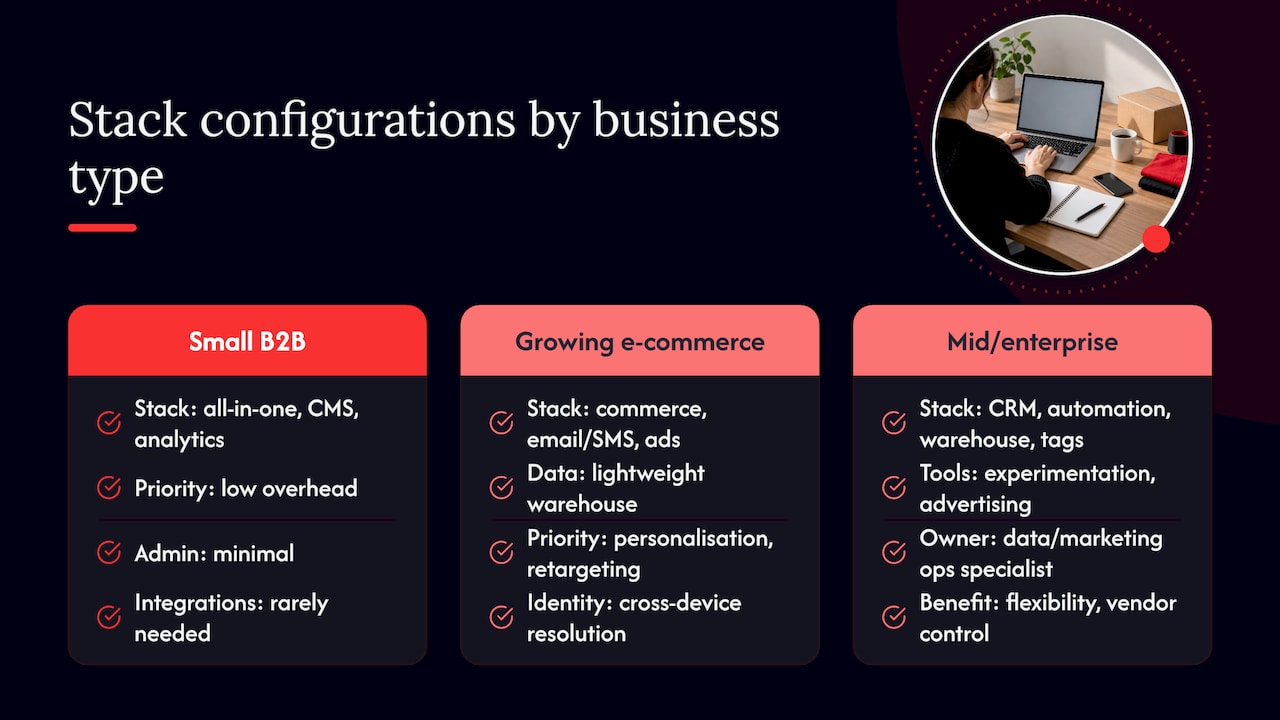
A small B2B services firm often does well with a single all-in-one platform covering CRM, email and basic automation, paired with a website CMS and an analytics tool. The priority is low overhead: one login, one bill, minimal admin, since there’s rarely a dedicated operations person to manage integrations.
A growing e-commerce business typically needs more specialisation: a CMS or commerce platform, an email and SMS automation tool, an advertising platform for paid social and search, and increasingly a lightweight data warehouse to unify order and behaviour data across channels. Personalisation and retargeting tend to be the priority here, so identity resolution across devices matters more than it does for a service business.
A mid-sized or enterprise organisation usually runs a composable stack: a CRM, a dedicated marketing automation platform, a cloud data warehouse acting as the central layer, tag management, and separate experimentation and advertising tools, often with a data or marketing operations specialist owning the integrations. The trade-off is more setup and governance work in exchange for flexibility and better long-term control over vendor lock-in.
There’s no single “correct” stack size. The common thread across all three is that the configuration matches the complexity of the business, not the number of tools a vendor manages to sell.
Key criteria for evaluating martech solutions
Three criteria consistently decide whether a tool earns its place long-term: scalability, usability and support.
Scalability means the tool keeps working as you grow, more contacts, more campaigns, more integrations, without the price or performance falling over. Ask vendors directly what happens to cost and speed at double your current volume, a vague answer is itself useful information.
Usability determines whether a tool actually gets used after the initial excitement fades. A powerful platform that takes six months to learn properly often delivers less value than a simpler one your team adopts in week one. Watch for how much training a new starter needs before they’re productive in the tool, that’s a fair proxy for real-world usability.
Support covers response times, documentation quality and whether you get a named contact or a ticket queue. For anything touching customer data or revenue, slow support during an outage is a business risk, not an inconvenience, so check service level commitments before signing rather than after something breaks.
A fourth, less obvious criterion worth adding: how well the vendor’s roadmap matches your own. A tool that’s perfect today but hasn’t shipped a meaningful update in two years is a slower-motion version of the same problem as a tool that doesn’t fit now.
One practical starter plan for busy marketing leaders
Most teams don’t need a grand transformation plan, they need thirty days of honesty about what they already own. In the first 30 days, run the audit: inventory, usage, cost, ownership. In the next 60, consolidate the obvious overlaps and automate the manual handoffs the audit exposed. By day 180, tackle the bigger platform decisions and any data layer work the earlier phases revealed you needed. Measure success at each stage by one thing: whether manual work actually went down, not by how many new tools got added.
— Hook
How Hook Digital can help build and run your marketing technology stack

Running fifteen vendor relationships to get one campaign out the door is the exact problem full-service marketing is built to remove: one team handling strategy, website work, content, paid media and reporting, so your stack decisions and your creative output move together instead of in separate queues.
A typical engagement starts with an audit of what you’re already running, moves into a plan that keeps what works and retires what doesn’t, then into delivery, website, content, campaigns, and ongoing optimisation based on what the data actually shows. If you’d rather talk through your current setup than read another framework, check our pricing or get in touch to start that conversation.
FAQ
What is a tech stack example?
A marketing tech stack example might include a CRM for contact records, a CMS for the website, an email and automation platform, an analytics tool, an advertising platform for paid campaigns, and a cloud data warehouse tying the data together. The exact mix depends on business size and goals, there’s no single standard combination every company should copy.
What are the 7 types of marketing?
Marketing is often broken down into categories such as content marketing, social media marketing, email marketing, search engine marketing, paid advertising, affiliate or partner marketing and direct marketing, though different sources group these slightly differently. The exact split varies by source, so treat it as a useful rough map rather than a fixed rulebook.
What is the 3-3-3 rule for marketing?
Definitions of the “3-3-3 rule” vary across marketing commentary, and there’s no single authoritative version. If you come across it, treat it as informal guidance rather than an established industry standard, and check the specific source before applying it to your own planning.
What are some popular marketing tools?
Popular tools span CRM and automation platforms, analytics and BI tools, advertising platforms, and increasingly generative AI tools for content and workflow support, which were reported among the most commonly adopted new tool categories in the 2025 State of Your Stack Survey. Which tools count as “popular” shifts year to year as categories expand, with the overall martech landscape growing to over 15,000 solutions in 2025.
Sources
- 2025 State of Your Stack Survey (MarTech)
- 2025 Marketing Technology Landscape Supergraphic: 100X growth since 2011, but now with AI… – chiefmartec
.png)


