

.webp)

.svg)
90 Minute Technical SEO Audit That Finds What Really Blocks Indexing

A technical SEO audit should hand you one thing above all else: a prioritised list of fixes that makes every page discoverable, renderable, indexed and fast enough for both search engines and AI agents to use. Run it in five layers: crawl, render, index, performance and AI access. Your first move is simple. Crawl the site now and export the results, because everything else in this checklist depends on that file.
TL;DR:
- Checking for accidental blocks in robots.txt and ensuring sitemaps contain only canonical URLs is crucial to prevent indexing issues.
- Server logs reveal the actual pages Googlebot fetches, highlighting discrepancies that crawlers alone may not uncover.
- Validating structured data and AI access through tools like the Rich Results Test ensures that content is correctly understood by AI agents and search engines.
- Fixing redirect chains and canonical loops can significantly improve crawl efficiency and signal clarity to search engines.
- Prioritizing high-impact, low-effort fixes such as correcting robots.txt and sitemap errors offers immediate improvements in site discoverability and indexing.
Table of Contents
- What is a technical SEO audit and what should it find?
- Which tools do you actually need for a full audit?
- How do you check crawl access, sitemaps and crawl errors?
- Is your JavaScript hiding content from search engines?
- Why are pages “crawled, currently not indexed”?
- What Core Web Vitals actually need fixing?
- Are you wasting crawl budget on the wrong pages?
- Is your structured data ready for AI search agents?
- How do you fix redirect chains and broken canonicals?
- How do you prioritise dozens of audit findings?
- When should you re-check the site after launch?
- When does a technical audit need an agency, not a DIY pass?
- The 90-minute audit is right, but most guides bury the AI layer
- How Hook-digital runs a full technical audit
- Sources
- FAQ
What is a technical SEO audit and what should it find?
A technical SEO audit checks whether search engines and AI agents can find, load and understand your pages. Miss any layer and you leave rankings on the table, no matter how good your content is.
Here’s the 90-minute quick pass, ordered so each step feeds the next:
- Crawl: run a full site crawl, check robots.txt line by line, and compare crawler URL counts against your sitemap.
- Render: disable JavaScript on three key page types and compare the result with Search Console’s rendered HTML.
- Index: pull the Search Console Pages report and sort “not indexed” reasons by volume.
- AI access: check robots.txt for accidental blocks on AI crawlers, then validate structured data.
- Core Web Vitals: check the field data verdict in Search Console, then use PageSpeed Insights to diagnose the worst offenders.
A well ordered pass like this, following the layered approach used in the 2026 technical SEO checklist, surfaces most urgent issues without needing days of manual digging. Capture robots.txt disallow lines, sitemap URL counts, GSC coverage reasons and Core Web Vitals pass rates as you go. Export everything into one sheet your developer can work from directly.
Which tools do you actually need for a full audit?
No single tool covers every layer, and that’s the trap most site owners fall into. A crawler alone tells you what your site looks like to a bot; it says nothing about what Google actually did with it.
- Google Search Console: the only source for real indexing decisions, coverage reasons and Core Web Vitals field data.
- Server logs: reveal what Googlebot genuinely fetched, distinct from what a crawler assumes it would fetch.
- Screaming Frog or Sitebulb: crawl the site to map redirects, canonicals, broken links and duplicate content at scale.
- PageSpeed Insights and Lighthouse: lab data for diagnosing why a page fails Core Web Vitals.
- Rich Results Test and Schema Markup Validator: confirm structured data is valid and eligible for rich results.
Crawlers simulate a visit. Server logs show what actually happened, and the gap between the two is where technical SEO audits usually find their most serious issues. Use crawlers for breadth, logs for truth.
How do you check crawl access, sitemaps and crawl errors?
Read robots.txt as if you were a machine, not a human skimming for the gist. A single misplaced Disallow: / left over from a staging environment can quietly block an entire site, and it happens more often than most site owners expect.
- Check for accidental blocks on staging paths, parameter URLs or entire subfolders.
- Confirm your XML sitemap contains only canonical, 200-status URLs, no redirects, no 404s, no noindex pages.
- Compare sitemap URL count against Search Console’s indexed count. A large gap is your earliest warning sign of an indexing or hygiene problem.
- Pull Crawl Stats and the coverage report in Search Console to log every crawl error by frequency and type.
Pro Tip: Save last month’s sitemap export and this month’s side by side. A shrinking sitemap with no corresponding page deletions almost always means a broken sitemap generator, not fewer pages.
Hand developers a short list: exact robots.txt lines to remove, sitemap entries to strip, and the top five crawl errors by volume.
Is your JavaScript hiding content from search engines?
Test this in two ways, and use both. First, disable JavaScript in your browser and reload the page. If the main content vanishes, so does Google’s easiest path to reading it.
- Compare what you see with JavaScript off against the rendered HTML in Search Console’s URL Inspection tool.
- If the two differ, check for blocked resources, failed API calls or scripts that time out before rendering completes. Comparing the live DOM against the rendered HTML is the fastest way to isolate which script is failing.
- Log every page template affected, not just individual URLs. One broken component often hits hundreds of pages.
- Decide on remediation: server-side rendering, hybrid rendering, or pre-rendering critical content for bots while keeping the client-side experience for users.
Sites migrating off older CMS platforms tend to hit this hardest. If you’re migrating from WordPress to a JavaScript-heavy framework, rendering issues are usually the first thing to break.
Why are pages “crawled, currently not indexed”?
Open the Pages report in Search Console and sort by reason, not by page. Volume tells you where to spend your time first.
- “Crawled, currently not indexed” usually points to thin or duplicate content, not a technical fault, so check content depth before touching code.
- “Discovered, currently not indexed” often signals a crawl budget problem: Google found the URL but decided it wasn’t worth fetching yet.
- Duplicate content without a user-selected canonical gets flagged separately. Check whether your canonical tags actually resolve to the version you intend.
- For genuine index bloat (filtered category pages, tag archives, thin location pages), consolidate similar pages or apply noindex deliberately rather than leaving Google to guess.
Technical fixes solve technical causes. Content problems need better content, not another crawl.
What Core Web Vitals actually need fixing?
Core Web Vitals field data lives in Search Console, and it’s the only version that counts for ranking purposes. Lab data from PageSpeed Insights is where you diagnose the cause.
The field thresholds: Largest Contentful Paint under 2.5 seconds, Interaction to Next Paint under 200 milliseconds, Cumulative Layout Shift under 0.1, measured across real user sessions.
Check whether failures sit at the origin level (affecting the whole domain) or the page-template level (affecting one section). That distinction changes your fix entirely.
- INP is now the most common failure point and usually traces back to long JavaScript tasks, not images.
- LCP failures are typically render-blocking resources or unoptimised hero images.
- CLS failures come from ads, embeds or fonts loading without reserved space.
Defer non-critical scripts, compress images properly and audit third-party tags before touching anything else.
Are you wasting crawl budget on the wrong pages?
Server logs show exactly which URLs Googlebot requested, how often, and with what response code. That’s information no crawler can give you, because a crawler only shows what’s crawlable, not what’s actually being crawled.
- Cross-reference logs against Search Console’s Crawl Stats to see where crawl budget leaks, usually into faceted navigation or parameter combinations nobody asked for.
- Flag repeated hits on 404 or 410 URLs; these should be removed from internal links and sitemaps immediately.
- Find orphan pages: URLs with no internal links pointing to them rarely get crawled at all, however good the content.
- Disallow low-value parameter patterns in robots.txt and rebuild internal links so priority pages get more link equity, not fewer clicks to reach them.
Is your structured data ready for AI search agents?
Schema and AI access sit together now, because both determine whether a machine, human search engine or LLM, can actually parse and cite your content.
- Validate Article, Product, FAQ and Organisation schema with the Rich Results Test and Schema Markup Validator.
- Check robots.txt for AI-specific user agents; a significant number of sites accidentally block AI crawlers without realising it.
- Confirm your HTML uses proper semantic elements, headings, lists, tables, rather than everything wrapped in generic
<div>tags. - Review the Rich Results report in Search Console for errors or warnings flagged after your last deploy.
Tools built specifically for AI-focused content strategy can help you understand what LLM systems actually pull from a page, beyond simple crawl access.
How do you fix redirect chains and broken canonicals?
Redirect chains cost crawl budget and dilute signal with every extra hop. A crawl tool will map every chain on the site in minutes; the fix is almost always mechanical.
- Collapse any redirect chain longer than one hop into a single 301 straight to the final destination.
- Remove broken internal links entirely rather than redirecting to a near-match page, and strip 404 URLs out of your sitemap.
- Confirm every page carries a self-referencing canonical tag unless there’s a deliberate reason for it to point elsewhere.
- Check for canonical loops, page A pointing to B, B pointing back to A, which confuse indexing decisions entirely.
Pro Tip: Run your canonical audit and redirect audit in the same crawl export. Chains and canonical loops often share a root cause, usually a CMS migration or old domain migration SEO left half-finished.
How do you prioritise dozens of audit findings?
A long list of issues is useless without a way to sequence the work. Plot every finding on a simple two-by-two: impact against effort.
- High impact, low effort: fix these first. A misconfigured robots.txt line, a sitemap full of 404s, a missing canonical tag, these take minutes to fix and unlock entire sections of the site.
- High impact, high effort: schedule these into the next sprint. Rendering overhauls, CMS migration risks, or a full internal linking restructure fall here.
- Low impact, low effort: batch these into routine maintenance rather than treating them as urgent.
- Low impact, high effort: deprioritise unless a business reason changes the calculation.
This prioritisation approach is what separates a useful audit from a 40-page report nobody reads. Estimate developer hours per item, then hand the top quadrant over as tickets, not prose.
When should you re-check the site after launch?
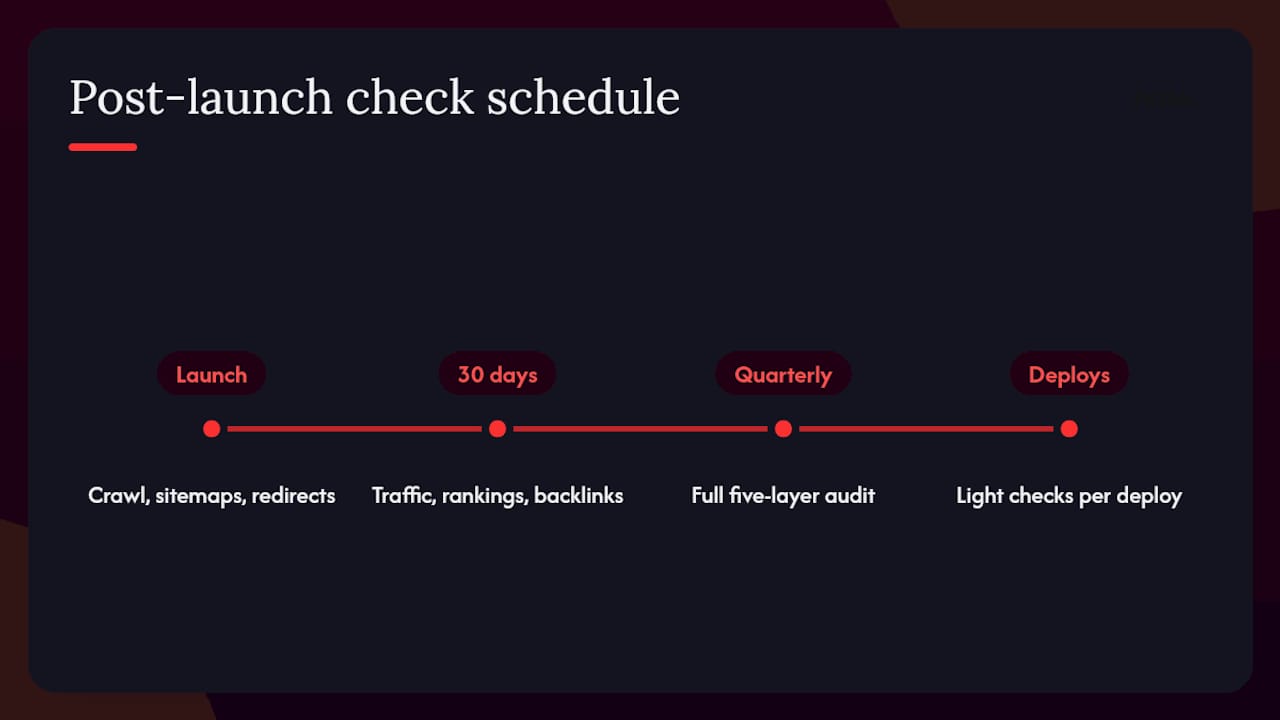
Launch day isn’t the finish line. Re-run your crawl the moment a new site or migration goes live, validate every sitemap, test that redirects resolve in one hop, and check Search Console coverage against pre-launch benchmarks.
Thirty days later, revisit traffic, rankings, backlinks and indexing status again. This 30-day recheck catches slow-burn issues, a redirect that silently breaks, a template that stopped rendering, that day-one checks miss. Pair this with your analytics and conversion tracking to confirm the numbers genuinely match expectations, not just crawl status.
For ongoing sites, run the full five-layer pass quarterly and a lighter version aligned to your deploy schedule, so nothing drifts unnoticed between full audits.
When does a technical audit need an agency, not a DIY pass?
Small sites can run this checklist solo. Sites with large numbers of URLs, multiple CMS platforms, or upcoming migrations usually benefit from professional help, as server log analysis at scale and coordinating fixes across a development team take dedicated time most in-house teams may lack.
An agency audit typically maps straight onto the prioritisation framework above: findings arrive already sorted into developer tickets, not a document that sits unread. Hook-digital brings that structure to technical audits alongside the wider marketing work it runs for Oxfordshire businesses, meaning technical fixes get connected to the SEO strategy driving actual demand, not treated as an isolated checklist exercise.
The 90-minute audit is right, but most guides bury the AI layer
Most technical SEO checklists still treat AI crawler access as an afterthought bolted onto the end, a paragraph about robots.txt tucked after Core Web Vitals. That’s backwards. AI access deserves equal billing with rendering and indexing, because a page that’s perfectly crawlable for Googlebot but silently blocked for an AI agent is invisible to an entire, growing slice of how people now find information.

The other overrated habit is treating crawl-only tools as sufficient. A crawler tells you what’s theoretically reachable. Server logs tell you what actually happened, and the two rarely match on any site older than a couple of years. If you only have time for one deeper check beyond the 90-minute pass, make it the log file comparison against Search Console’s Crawl Stats.
What the reader should prioritise first isn’t the glamorous stuff, structured data, fancy schema markup, but the boring gap between your sitemap count and your indexed count. That single number, checked in under five minutes, tells you more about the health of a site than most 40-point checklists put together.
— Hook
How Hook-digital runs a full technical audit
An agency can be the alternative to juggling a crawler subscription, a log analyser and a freelance developer separately. Technical audit findings can connect directly to the SEO, website and development work needed to fix them, without coordinating three different suppliers.

A commissioned audit from Hook-digital covers all five layers, crawl, render, index, AI access and Core Web Vitals, delivered as a prioritised list your developer can action straight away rather than a report that sits in a drawer. Where the fixes need rebuilding pages or restructuring navigation, the WebBuilds team handles that directly, and ongoing SEO and performance work keeps the site monitored between full audits rather than waiting for the next crisis. If you’d rather talk through what a full audit would uncover on your own site, book a free marketing consultation and get a straight answer on where to start.
Sources
- Technical SEO Audit: The 2026 Checklist for Crawl, Render, and AI Access | MarqOps
- How to Conduct a Technical SEO Audit: The Complete 2026 Framework | Luciano Bonanno
- Technical SEO Checklist: The Complete Guide For 2026 | DebugBear
- The technical SEO checklist for search engines and AI search | Semrush
- Ultimate site migration SEO checklist | Search Engine Land
FAQ
What Is a Technical SEO Audit?
A technical SEO audit checks whether search engines and AI agents can crawl, render, index and load your pages fast enough, producing a prioritised list of fixes rather than a general content review.
What Is the Difference Between an SEO Audit and a Technical SEO Audit?
A general SEO audit often covers content, keywords and backlinks too; a technical SEO audit focuses specifically on crawlability, rendering, indexing, Core Web Vitals and AI crawler access.
Can ChatGPT Do an SEO Audit?
ChatGPT can help interpret crawl exports or explain robots.txt syntax, but it can’t crawl your live site, read Search Console data or check server logs, so it can’t replace the actual audit process.
Can I Do My Own Technical SEO Audit?
Yes, using the 90-minute checklist above with Screaming Frog or Sitebulb, Search Console and PageSpeed Insights. Larger or migrating sites usually benefit from an agency handling server log analysis and developer coordination as part of their broader marketing support.
.png)


