



Technical SEO Basics: A Practical Guide for Business Owners

Technical SEO is the work that makes sure search engines can find, read and store the pages on your website. If that work is not done, good content and strong branding never reach the people searching for you. The basics come down to five questions. Can Google crawl your pages? Can it index them? Does your site load quickly on a phone? Is it secure? Is it clearly structured? This guide explains each one in plain terms, shows you where to start, and helps you decide what to handle in-house and what to hand to a specialist.
TL;DR
- Technical SEO is the website infrastructure side of search: crawling, rendering, indexing and serving your pages correctly.
- Start with indexing. Check which pages Google has stored and which it has not, before you worry about anything else.
- The core checks are crawl access, indexability, page speed, mobile usability, HTTPS, clean site structure and working internal links.
- The same foundations help AI search tools find and cite your content, so the work pays off beyond Google’s results page.
- Fix by impact. Pages that bring in enquiries come before pages nobody visits.
Table of Contents
- What technical SEO actually is
- How Google crawls, renders and indexes your site
- The technical SEO basics, one by one
- How to run a first technical check
- A worked example: pages in the sitemap that Google has not indexed
- What to prioritise if you are a B2B or professional services firm
- Technical SEO and AI search
- Our view: fix the foundations before you add more content
- Where we can help
- FAQ
- Sources
What technical SEO actually is
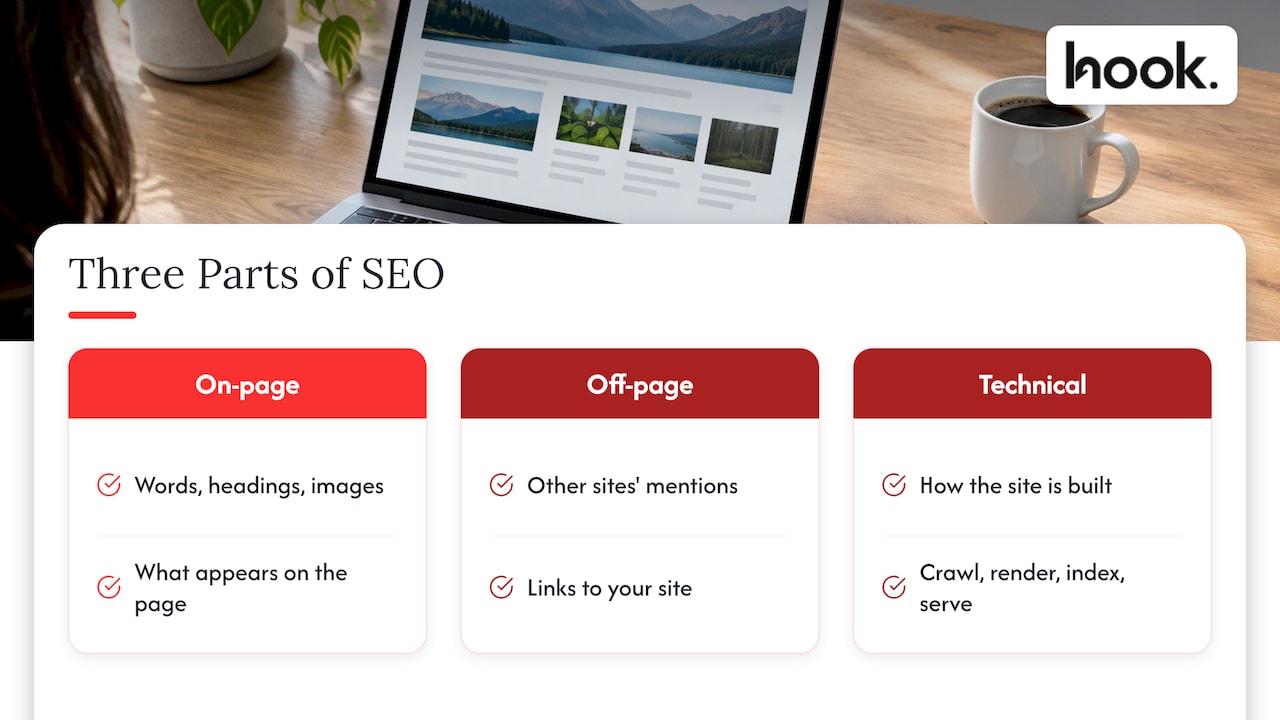
SEO is usually split into three parts. On-page SEO is what is on your pages: the words, headings and images. Off-page SEO is what other sites say about you, mainly links. Technical SEO is how your site is built and delivered. One way to put it: on-page covers what is on the page, technical covers how it is built and served.
A practical definition comes from Search Engine Land’s technical SEO guide: technical SEO optimises your website’s infrastructure so search engines can crawl, render, index and serve your content correctly and efficiently. It is the only part of SEO that decides whether your content is seen in the first place. A brilliant service page that Google cannot reach ranks for nothing.
There is a newer reason to care. AI tools such as ChatGPT, Claude and Gemini also need to read your site before they can cite it. Pages that cannot be crawled or indexed are far less likely to be surfaced in AI answers, which makes the fundamentals matter more as search broadens, not less.
How Google crawls, renders and indexes your site
You do not need to be an engineer to understand the process. You do need the vocabulary, because every audit report uses it.
Google describes Search as working in three stages: crawling, indexing and serving results.
- Crawling. Google’s automated programme, Googlebot, downloads the text, images and videos on your pages. It follows links from page to page, so a page with no links pointing to it may never be found.
- Rendering. Many modern sites build their pages in the browser using JavaScript. Google runs that code with a recent version of Chrome so it can see what a visitor sees.
- Indexing. Google analyses the content, picks a preferred (canonical) version when several pages look alike, and stores what it learns. Not every page it processes is indexed.
- Serving. When someone searches, Google pulls from that stored index to build the results.
Two details from Google’s own documentation are worth knowing. First, Google’s crawling guidance notes that the median mobile page has grown from 816 kilobytes to 2.3 megabytes, with more than 60 files to load, and that crawl rate slows automatically when a site returns server errors such as HTTP 500. A shaky server therefore reduces how often Google visits you.
Second, Google’s JavaScript guidance explains that pages are queued for crawling and then for rendering, and that server-side or pre-rendering is still recommended because it makes sites faster and not every bot can run JavaScript. If your website relies heavily on scripts to show its main content, this is the first thing to raise with your developer.
The technical SEO basics, one by one
Here is the practical list. Each item is a question you can ask of your own site.
Crawlability: can Google reach your pages?
Crawlability is about access. Your site has a file called robots.txt that tells crawlers which areas they may visit. A mistaken line in that file, often left over from when the site was being built, can block an entire site. Check that your important pages are open, and that your internal links connect every page you care about to the rest of the site.
Also look at your server. Repeated errors make Google slow down. If your hosting struggles under normal traffic, search visibility suffers quietly.
Indexability: will Google store them?
A page can be crawled and still left out of the index. Common causes are a “noindex” instruction on the page, a canonical tag pointing to a different page, duplicate or very thin content, and redirects that loop. An XML sitemap, which is a list of the URLs you want indexed, helps Google find your pages. It should list only the real, live pages you want people to land on.
One rule keeps things tidy: your internal links, sitemap entries, redirects and canonical tags should all point to the same version of each URL. Mixed signals are a frequent cause of pages dropping out.
Site speed and mobile usability
Slow pages lose visitors and make crawling harder. Large uncompressed images are the most common culprit on business sites, followed by heavy scripts and cheap hosting. Test your key pages on a real phone over mobile data, not only on an office connection. Most B2B buyers research on their phones at some point, even if they sign on a desktop.
Security: HTTPS everywhere
Your site should load over HTTPS, the secure version of the web address, on every page, with the plain http versions redirecting to it. Beyond the ranking angle, a browser warning on a contact form is a quick way to lose an enquiry.
Structure and internal links
A clear structure means a visitor, and a crawler, can reach any important page in a few clicks. Group related pages, use descriptive URLs, and link from strong pages to the ones you want to lift. Broken links and long redirect chains waste crawl effort and frustrate people.
Structured data and readable HTML
Structured data is extra code that labels your content, such as marking up your business address, reviews or FAQs, so machines understand it. Keeping your main text in plain HTML, not hidden behind scripts, helps both search engines and AI tools extract it accurately.
A quick reference
| Area | The question to ask | Where to check |
|---|---|---|
| Crawl access | Is anything important blocked? | robots.txt file, Google Search Console |
| Indexing | Are my key pages stored by Google? | Search Console Page Indexing report |
| Speed | Do pages load quickly on mobile? | Real phone tests, speed testing tools |
| Security | Is every page on HTTPS? | Browser address bar, redirect check |
| Structure | Can every page be reached in a few clicks? | Site crawl, navigation review |
| Rendering | Does the main content show without JavaScript? | HTML-only crawl versus full crawl |
| Markup | Do key pages carry structured data? | Page source, validation tools |
How to run a first technical check
A full audit is a job for a specialist, but a business owner or marketing manager can run a useful first pass in an afternoon. Our own 90-minute technical SEO audit goes into more depth on what blocks indexing. Here is the short version.
- Set up Google Search Console. It is Google’s free reporting tool for site owners, and it shows what Google can and cannot see. You verify that you own the site, then submit your sitemap.
- Start with indexing. Search Engine Land’s advice on where to focus is to fix indexing issues first: filter the Page Indexing report by your XML sitemap, compare the sitemap’s URLs with what Google has indexed, and investigate any sitemap URLs that are not indexed. Those are pages you want found that Google has declined to store.
- Crawl your own site. A crawling tool follows your links the way Googlebot does and flags broken links, redirect chains, duplicate content, thin pages and missing page titles. Run it with and without JavaScript. Search Engine Land’s migration guidance recommends both a JavaScript-enabled crawl and a pure HTML crawl to spot content that search bots cannot see.
- Treat odd errors with care. The same guidance notes that random 404 errors in SEO tools often come from server-side rate limiting, misconfigured caching or load balancer errors, so check with whoever runs your hosting before you start rewriting pages.
- Check speed and mobile on your top pages. Pick the five pages that generate the most enquiries and test those first.
- Write the list down and rank it. This is where most audits go wrong. A report with 200 warnings helps nobody. A ranked list of ten fixes does.
How often should you repeat it? A quarterly check is a sensible rhythm, with an extra one after any big change such as a redesign, a CMS change or a migration to a new address structure. Backlinko’s technical SEO guide suggests the same cadence.
A worked example: pages in the sitemap that Google has not indexed
Say a professional services firm in Oxfordshire has 40 service and case study pages in its sitemap, but Search Console shows only 26 indexed.
The firm opens the Page Indexing report, filters it by the sitemap and reads the reasons given for the 14 pages left out. Suppose the reasons are mixed: five pages carry a leftover noindex instruction from the staging site, six are near-duplicate location pages with almost identical text, and three redirect to other pages.

The fixes follow from the diagnosis. Remove the noindex instruction from the five pages. Merge or rewrite the six duplicates so each has a reason to exist. Take the three redirecting URLs out of the sitemap. Then request re-indexing for the important pages in Search Console and check the report again after a few weeks. The test of success is simple: the number of indexed sitemap URLs goes up and the reasons list gets shorter.
The example is illustrative, not data from a real client, but the pattern is common. The diagnosis comes first and the fix second, and it is cheap compared with writing new content that sits in the same pile. If thin or overlapping pages are your issue, our guide to content pruning for SEO shows what to cut, merge or keep.
What to prioritise if you are a B2B or professional services firm
B2B sites are usually small. A professional services firm might have 30 to 150 pages, not 30,000. That is an advantage: a thorough technical clean-up is achievable, and the gains show up on pages that matter commercially.
Bruce Clay, writing for Search Engine Land, argues that teams who cannot do everything should prioritise fixes by their impact on pages, revenue and user journeys, taking quick wins first and starting with small groups of pages, not site-wide changes. For a firm in Oxford or elsewhere in Oxfordshire, that translates into an order like this:
- Service pages and contact routes. Make sure every page that can win an enquiry is crawlable, indexed, fast and secure.
- Landing pages for campaigns. If you send paid traffic to pages, the same speed and mobile checks apply. Our guide to PPC landing pages that pass the three second test covers that side.
- Case studies and insight articles. These build trust and capture research-stage searches, so they need to be indexed and linked from your main navigation.
- Everything else. Old news posts, tag archives and duplicated pages come last, or get pruned.
It also helps to tie technical work to the wider picture. SEO feeds demand generation, and a site that cannot be crawled starves it. We cover that link in the role of SEO in demand generation. And if you are weighing up where your website sits in the wider plan, see why your website is the heart of your marketing strategy.
Keyword research and conversion sit on top of the basics
Technical SEO does not replace the other work. Once your pages can be found, B2B keyword research tells you which phrases decision-makers type, and landing page design decides whether a visit becomes an enquiry. Think of the technical layer as the foundation: invisible when it is right, expensive when it is wrong.
Technical SEO and AI search
More of your buyers will meet your business through AI-generated answers. These systems pull from multiple sources, and the same fundamentals apply. Pages need to be crawlable and indexable, the HTML should not depend on JavaScript to show its main content, and clear headings and structured data give context. DebugBear’s 2026 checklist makes the same argument, and its list extends the traditional checks to include access for AI crawlers in your robots.txt file. In practice, if you tidy your technical basics for Google, you have done most of the work for AI tools as well.
Our view: fix the foundations before you add more content
We meet a lot of marketing teams who are producing new content every month while a handful of technical problems quietly hold the whole site back. A blocked folder, a stray noindex instruction, a slow template. None of it is glamorous, and all of it is cheaper to fix than a new campaign is to run.
Our view is that technical SEO should never sit in its own silo. The person fixing your indexing needs to talk to the person writing your pages, the designer building your templates and the person running your ads, because a change in one place affects the others. That is why we built Hook around being one team: you talk to one agency, not several, and the admin of coordinating them is not on your desk.
We also think scopes should fit the problem. We do not force packages. We scope the work around what your site needs, and our client portal keeps you updated in one place. When your site needs a content or website amend, our turnaround is 48 hours.
Hook
Where we can help
If you would rather have the checks done and the fixes made than learn the tools yourself, our team handles SEO and performance optimisation alongside website design and development, so a technical finding becomes a fix without a hand-off between agencies. You can see how that works on our SEO and website services page, or look at full service marketing if you want search, design, content and paid media managed together from Oxford.

We scope each project around your site, with no forced packages, so you pay for the work your site needs.
FAQ
What is the difference between SEO and technical SEO?
SEO is the whole discipline of earning visibility in search, covering content, links and site health. Technical SEO is the part that deals with how your site is built and delivered: whether pages can be crawled, rendered, indexed and loaded quickly. Without it, the rest of your SEO has nothing solid to stand on.
Can you give an example of technical SEO?
A common one is a page that carries a leftover noindex instruction from the time the site was being built. Google crawls the page but never adds it to its index, so it cannot rank. The fix is to remove the instruction, resubmit the page in Google Search Console and check the Page Indexing report to confirm it has been picked up.
How often should I run a technical SEO audit?
A quarterly check is a sensible baseline, with another one after major changes such as a redesign, a CMS change, a migration or an unexplained traffic drop. Small sites can keep the routine light: indexing report, broken links, speed on your top pages.
Is technical SEO still worth it with AI search?
Yes. AI tools need to crawl and read your content before they can cite it, so crawlability, clean HTML and clear structure carry over directly. Work you do to help Google understand your site also helps these systems.
Where should a small professional services firm start?
Start with Google Search Console and the indexing report, focusing on the pages that bring in enquiries: service pages, contact pages and case studies. Fix those first, then move to speed and structure. A ranked list of a few fixes is more useful than a long report of warnings.
Sources
- What Is Technical SEO? The Definitive Guide (Search Engine Land)
- In-Depth Guide to How Google Search Works (Google Search Central)
- Things to Know about Google’s Web Crawling (Google)
- Understand the JavaScript SEO basics (Google Search Central)
- Where to focus technical SEO when you can’t do it all (Search Engine Land)
- Technical SEO post-migration: how to find and fix hidden errors (Search Engine Land)


