



Website accessibility and UK law: what your business must do
There is no single UK law that tells every business its website must meet a named technical standard. Two legal routes matter. The Equality Act 2010 applies to any organisation that serves the public, and it requires reasonable adjustments so disabled people are not put at a disadvantage. The Public Sector Bodies (Websites and Mobile Applications) (No. 2) Accessibility Regulations 2018 go further for public sector sites, requiring WCAG 2.2 level AA and a published accessibility statement. This guide explains which one applies to you, what the risks are and what to do next.
TL;DR
- If you sell to or serve the public, the Equality Act 2010 covers your website. You must make reasonable adjustments for disabled users.
- Public sector bodies must meet WCAG 2.2 AA and publish an accessibility statement. Some charities and other organisations are also in scope.
- WCAG is not written into the Equality Act for private businesses, but it is the sensible benchmark to work to.
- The enforcement bodies can investigate, issue notices and go to court, so fix the basics before anyone complains.
- Start with a sample-based check, a fix plan and a clear statement, then build accessibility into every new page.
Table of Contents
- The two laws that matter for UK websites
- How the Equality Act 2010 applies to your website
- Who must follow the public sector regulations
- What an accessibility statement must say
- Exemptions and “disproportionate burden”
- What happens if you get it wrong
- A practical plan to improve accessibility
- Our perspective
- How Hook Digital can help
- FAQ
- Sources
The two laws that matter for UK websites
UK website accessibility rests on two pieces of legislation. They work in different ways, and mixing them up is the most common mistake we see.
| Equality Act 2010 | Public sector accessibility regulations 2018 | |
|---|---|---|
| Who it covers | Anyone providing services to the public, public or private | Public sector bodies, with listed exemptions |
| Technical standard named? | No | Yes, WCAG 2.2 AA |
| Accessibility statement required? | No | Yes |
| Core duty | Reasonable adjustments for disabled people | Meet the standard and publish a statement |
GOV.UK explains that the regulations build on existing obligations under the Equality Act 2010 (or the Disability Discrimination Act 1995 in Northern Ireland), so every UK service provider has a legal duty to make reasonable adjustments. The regulations add a specific, measurable standard for the public sector on top.
How the Equality Act 2010 applies to your website
The Act does not mention websites by name. It does not need to. Section 29 says a person providing a service to the public, whether for payment or not, must not discriminate against someone who needs that service. That covers not providing the service, the terms on which it is offered, ending it, or subjecting someone to any other detriment.
The Equality and Human Rights Commission (EHRC) is clear that this reaches online delivery. Its statutory Code of Practice for services confirms that services provided remotely, through websites or apps, are subject to the Act.
What “reasonable adjustments” means in practice
The duty is anticipatory. You cannot wait until a disabled customer complains and then start fixing things. You are expected to think ahead about the needs of people with a range of impairments, such as visual, hearing, motor and cognitive differences.
What is “reasonable” depends on your size, resources and the nature of the service. A sole trader with a five-page brochure site is judged differently from a national retailer with a checkout. But the duty applies to both.
In practical terms, barriers that commonly fall short include:
- a checkout or enquiry form that cannot be completed using a keyboard alone
- images with no text alternative, so a screen reader user hears nothing useful
- videos without captions or a transcript
- text with too little contrast against its background
- links and buttons that are too small or too close together to tap accurately
No set standard, but WCAG is the benchmark
For private businesses, no UK regulation says your site must hit WCAG 2.2 AA. There is no tick-box that guarantees you have met the Equality Act. In practice, though, the Web Content Accessibility Guidelines are the yardstick most people use when asking whether a site is reasonably accessible. Working to WCAG 2.2 AA gives you a defensible, structured way to show you took the duty seriously.
That is also why we recommend it to clients who are not legally bound by the public sector rules. It turns a vague duty into a checklist you can work through.
Who must follow the public sector regulations
The Public Sector Bodies (Websites and Mobile Applications) (No. 2) Accessibility Regulations 2018 came into force on 23 September 2018. GOV.UK says all public sector bodies must meet them unless they are exempt. That means central and local government, plus some charities and other non-government organisations.
The requirements are two-fold:
- Make your website and mobile apps meet WCAG 2.2 AA.
- Publish an accessibility statement explaining how accessible they are.
Who is exempt
Regulation 4 sets out the exceptions. They include public service broadcasters and their subsidiaries, non-governmental organisations (unless they provide essential public services or services for disabled people), and schools and nurseries, except for essential online administrative functions.
GOV.UK adds detail on charities: they are exempt unless they are mostly financed by public funding, provide essential public services, or are aimed at disabled people. If you run a charity or a school and are unsure which side of the line you fall, check the official guidance on who must comply and take advice from your governance or legal contact.
What changed with WCAG 2.2
The UK government’s own guide to WCAG confirms that WCAG 2.2 adds six new success criteria to earlier versions. Three sit at level A or AA in ways that affect everyday design decisions:
- Target Size (Minimum), so buttons and links are big enough to hit
- Dragging Movements, so anything done by dragging also works another way
- Accessible Authentication (Minimum), so logging in does not rely on memory tests or puzzles
The others are Focus Not Obscured (Minimum), Consistent Help and Redundant Entry. The same guide states that public sector sites and apps must pass the criteria for both level A and level AA.
What an accessibility statement must say
If you are in scope of the regulations, your statement must be written in plain English and cover specific points. According to GOV.UK guidance on publishing a statement, it should say:
- whether your site is fully, partially or not compliant
- which parts do not meet the standard, and why
- how people can get alternatives to inaccessible content
- how to contact you to report a problem
Even if you are a private business and not required to publish one, a short, honest statement is good practice. It tells disabled visitors you have thought about them and gives them a route to ask for help, which is exactly the kind of adjustment the Equality Act expects.
Exemptions and “disproportionate burden”
The regulations do not demand the impossible. GOV.UK lists content that is outside the requirements, including:
- pre-recorded audio and video published before 23 September 2020
- live audio and video
- PDFs and other documents published before 23 September 2018, unless needed to use a service
- intranet and extranet content published before 23 September 2019
- archived websites that are not needed for services and are no longer updated
There is also a “disproportionate burden” provision. Under Regulation 7, a public sector body need not comply if doing so would impose a disproportionate burden. It must first assess the extent of that burden, taking account of its size, resources and nature, and the estimated costs and benefits. If it relies on the exemption, its accessibility statement must explain which parts it could not meet and, where appropriate, offer accessible alternatives.
This is not a loophole to avoid work. It is a recorded decision that has to stand up to scrutiny, and it does not cover things you could reasonably fix.
What happens if you get it wrong
GOV.UK states that organisations that fail to meet the requirement, or fail to respond properly to a request for accessible information, will be failing to make reasonable adjustments and so in breach of the Equality Act 2010 (or the Disability Discrimination Act 1995 in Northern Ireland). The EHRC, and the Equality Commission for Northern Ireland, can use legal powers that include investigations, unlawful act notices and court action.
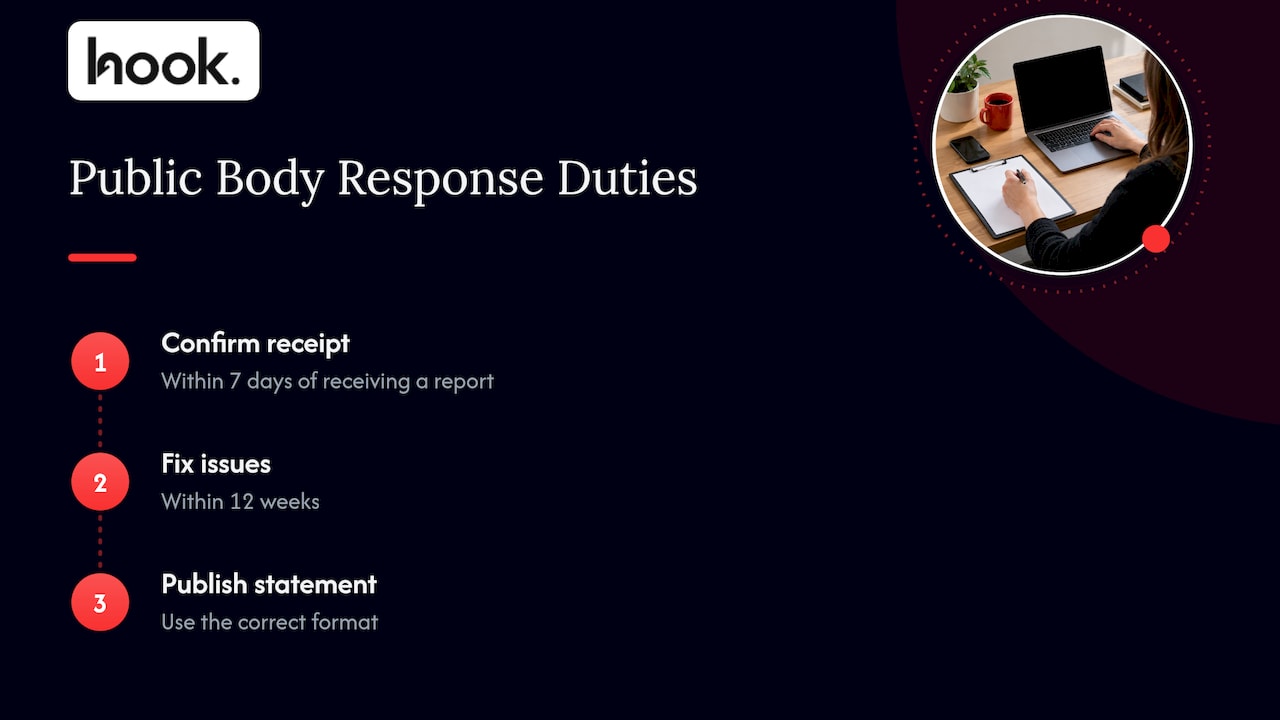
For public bodies there is an extra layer. The Government Digital Service monitors compliance. GOV.UK’s monitoring guidance says that after receiving a report, a body must confirm receipt within 7 days and fix issues within 12 weeks, and publish a correctly formatted statement.
If you are a private business and a customer says your website has shut them out, the realistic risk is a complaint, a request for adjustments or a claim. The cost of dealing with that is usually far higher than the cost of fixing the underlying problem. If you receive a formal complaint or letter, speak to a solicitor who handles discrimination or equality law before you reply.
A practical plan to improve accessibility
GOV.UK’s own advice for public sector sites is a sensible template for any organisation. Its four-step approach is:
- Check a sample. Test pages that show the variation in your content and functionality, not every page. Think home page, a service page, a form, your checkout or booking flow, a blog post and a PDF.
- Make a fix plan. Work through the problems within reason, with your developers, suppliers and content editors.
- Publish a statement in plain English.
- Make new features accessible so you do not rebuild the problem every time you add something.
All of this is checked against WCAG 2.2 AA. GOV.UK also notes that if you cannot reasonably afford an external supplier to do a detailed audit, you can judge that it would be a disproportionate burden and do a basic accessibility check that needs no technical knowledge.
A quick self-check you can run today
Before you commission anything, spend 20 minutes on your own site:
- Put your mouse aside and try to complete your main enquiry form using only the Tab, Enter and Space keys.
- Zoom the browser to 200% and see if content still reads and works.
- Check that every meaningful image has a short description that makes sense out of context.
- Play any video with the sound off. Are there captions?
- Look at your text colours. Pale grey on white is a common offender.
- Open a page and check headings run in a logical order, rather than being chosen for their size.
This will not replace a proper audit, but it often shows you where the biggest barriers are.
Where accessibility fits with the rest of your site
Accessibility overlaps with many things you are probably already doing. Clean heading structure, descriptive link text and fast, stable pages help screen reader users and also support search performance. If you are working through a technical review anyway, our 90-minute technical SEO audit covers structural issues that frequently overlap with accessibility fixes. And because accessibility can slip as content is added, it belongs in your website maintenance plan alongside updates, backups and security.

If you are planning a new site, building accessibility in from the start is far cheaper than retrofitting. Our guide on how to create a small business website in the UK walks through the planning stage.
Our perspective
Most of the accessibility problems we see are not caused by bad intentions. They come from sites built by one supplier, edited by another, promoted by a third and checked by nobody. Each party assumes someone else has the standard covered.
That is why we think accessibility is a coordination problem as much as a technical one. When design, development, content, photography and video sit under one roof, colour choices, captions, image descriptions and page structure can be decided together, rather than discovered at the end by an audit.
It is also why we scope work around what you actually need, with no forced packages. If your site needs a handful of fixes and a clearer statement, that is the project. If it needs a rebuild, we will say so and plan it with you. And once the work is done, we aim to turn content and website amends around within 48 hours, so a problem found next month does not wait in a queue.
Treat WCAG 2.2 AA as your working target, even where the law does not name it. It gives your team a shared, testable goal, and it shows disabled customers you are serious about serving them.
Hook
How Hook Digital can help
If your website needs rebuilding, or you want accessibility considered properly in a redesign, our website design and development service brings design, build and ongoing improvement together with one team and one point of contact. You also get a client portal for direct communication and updates, so you always know where a project stands.
If you would rather start with the performance and search side of your current site, see our SEO and performance optimisation work. Tell us what you are dealing with and we will scope it around your needs, not a fixed package.
FAQ
Is website accessibility a legal requirement for private businesses in the UK?
Yes, in the sense that the Equality Act 2010 applies to any organisation providing services to the public, including online. You must make reasonable adjustments for disabled people. The Act does not name a technical standard for private sector websites, so WCAG 2.2 AA is widely used as the benchmark.
Do I need an accessibility statement?
Public sector bodies in scope of the 2018 regulations must publish one. Private businesses are not required to by those regulations. A plain-English statement is still good practice because it shows what you have done and gives people a way to contact you about problems.
Which WCAG version and level should I aim for?
Aim for WCAG 2.2 level AA. That is the standard the UK government requires of public sector websites and apps, and it is the most practical target for any other organisation too. Level AA means passing both the level A and level AA success criteria.
Can a small business claim a disproportionate burden?
The disproportionate burden provision is part of the public sector regulations, and it requires a documented assessment of your size, resources and the costs and benefits. It does not remove the need to fix what you reasonably can. Under the Equality Act, what counts as reasonable also depends on your size and resources, so keep a record of your decisions.
What are the consequences of ignoring accessibility?
Failing to make reasonable adjustments puts you in breach of the Equality Act 2010. The EHRC can investigate, issue unlawful act notices and take court action. A disabled person who has been disadvantaged can also pursue a claim. If you are facing a complaint, take advice from a solicitor.
Sources
- Understanding accessibility requirements for public sector websites and apps, GOV.UK
- Make your website or app accessible and publish an accessibility statement, GOV.UK
- Public sector website and mobile application accessibility monitoring, GOV.UK
- Equality Act 2010, section 29, legislation.gov.uk
- EHRC Code of Practice for services, public functions and associations, chapter 11
- Public Sector Bodies Accessibility Regulations 2018, regulation 4, legislation.gov.uk
- Public Sector Bodies Accessibility Regulations 2018, regulation 7, legislation.gov.uk
- Guide to WCAG, UK government on GitHub


