

.webp)

.svg)
5 step PPC audit checklist for marketing managers: prioritise fixes
Start by verifying conversion tracking and shutting down any immediate wasted spend: these two checks fix most common PPC losses. Run a full audit every quarter and keep a weekly eye on spend and click-through rate so small issues never become expensive ones. Done properly, this checklist helps you recover wasted budget, fix broken attribution and catch tags that have silently stopped firing.
TL;DR:
- Verifying conversion tracking weekly is crucial, as broken tags can distort all performance data and lead to wasted ad spend.
- Regularly reviewing search terms for irrelevant queries and adding negatives prevents waste and improves campaign targeting.
- Fixing high-cost, low-return campaigns and landing page issues can recover significant budget and boost conversions quickly.
- Automated bidding strategies require at least 50 conversions per month to stabilize; lower volumes should rely on Enhanced CPC or manual bidding.
- Proper account structure, clear naming conventions, and segmented objectives make diagnostics easier and enhance overall campaign performance.
Table of Contents
- Prioritised PPC audit checklist: your ordered action list
- Tracking, tags and consent: how to verify your conversion data
- Account structure and targeting: is your account built to measure well?
- Keyword and negative keyword review: cutting irrelevant spend
- Ad creative and asset testing: are your ads earning the click?
- Bidding, budgets and automation: when to trust the algorithm
- Landing pages and conversion experience: where clicks turn into results
- Measurement, reporting and audit cadence: what to check and how often
- Tools, reports and templates for a faster audit
- Turning findings into a dated action plan
- How we run a PPC audit at Hook Digital
- Attribution models and the multi-channel picture
- Fixing it yourself or bringing in help
- How Hook Digital can help with your PPC audit and fixes
- FAQ
- Sources
Prioritised PPC audit checklist: your ordered action list
A good audit does not treat every problem equally. Some checks reveal money haemorrhaging out of your account right now; others uncover slower, structural drag. Work through this list in order, because each step either stops a leak or gives you the data you need for the next one.
- Verify conversion tracking. Test: open Google Ads diagnostics and confirm each conversion action has fired in the last 7 days. Impact: high, since broken tracking skews every decision downstream. Effort: low. Verification: compare conversion counts in Ads against your CRM or analytics for the same period.
- Identify runaway spend. Test: sort campaigns by spend versus conversions over 30 days and flag anything with high cost and near-zero results. Impact: high and immediate. Effort: low, usually a pause click away. Verification: confirm spend drops in the next 48 hours of reporting.
- Check for broken landing pages. Test: click through every active ad to its destination URL. Impact: high where traffic is being sent to dead or slow pages. Effort: low to medium depending on who owns the website. Verification: page loads correctly on both desktop and mobile.
- Close negative keyword gaps. Test: export 90 days of search terms and scan for obviously irrelevant queries. Impact: medium to high over time. Effort: low. Verification: added negatives stop reappearing in the next search terms report.
- Flag high CPA campaigns. Test: compare cost per acquisition by campaign against your actual margin or deal value. Impact: medium, often the clearest sign of a bidding or targeting mismatch. Effort: medium. Verification: CPA trend improves over the following two to three weeks.
For each item you fix, note down:
- Owner: who is responsible for making the change.
- Deadline: the date it needs to be live by.
- Verification method: how you will confirm the fix worked, and by when.
This five-step pass is deliberately front-loaded. The first two items alone often explain most of the wasted spend a marketing manager finds when they finally sit down and look properly. Everything from here deals with why those problems happen and how to stop them recurring.
Tracking, tags and consent: how to verify your conversion data
Before you trust a single number in your reports, confirm that your primary conversion actions actually map to revenue or qualified leads. A common and expensive mistake is optimising towards a low-value action, such as a newsletter sign-up, while treating it as if it were a sale. Check which conversion action is marked as “primary” in Google Ads and ask whether it genuinely reflects what your business cares about.
Next, check your tag deployment. Confirm whether you are running a sitewide Google tag or Google Tag Manager, and verify it fires correctly on every page that matters, especially thank-you and confirmation pages.
- Install Tag Assistant and walk through a real conversion path end to end.
- Open Chrome DevTools’ network tab and confirm the tag request fires with the right parameters.
- Check the Google Ads diagnostics panel for any flagged issues on your conversion actions.
If you generate leads rather than direct sales, follow the enhanced conversions for leads implementation checklist, which requires sitewide tag implementation, client-side hashing of personal data using SHA-256, the correct match keys, and regular uploads or imports so Google can match more conversions back to the click that caused them. Google’s own guidance also lists specific diagnostics, including a dedicated enhanced conversions report, so you can confirm imported conversions are appearing correctly when you segment by conversion time. Our guide to enabling enhanced conversions walks through the setup in more detail.
Google notes that quality checks and a training period are required before modelled conversions become reliable, which matters if you are relying on consent mode to fill measurement gaps. Consent mode needs correct implementation and a minimum volume of ad clicks before its modelling settles into something you can trust.
On consent itself, PECR requires valid, freely given and specific consent for non-essential tracking technologies in the UK, and that consent has to come from an unambiguous positive action rather than simply continuing to browse a page. If your cookie banner implies consent by default, or bundles tracking consent in with general terms, your conversion data may be more fragile than it looks. Our cookie consent checklist covers the practical steps for getting this right.
Account structure and targeting: is your account built to measure well?
A well-organised account is easier to diagnose and easier to optimise. Before touching bids or budgets, check whether the structure itself is working against you.
- Naming conventions: campaigns and ad groups should be named consistently enough that anyone on your team can understand what each one targets without opening it.
- Single objective per campaign: a campaign mixing brand search, generic search and display reach makes performance impossible to read clearly.
- Brand versus non-brand separation: branded search typically converts at a very different rate to generic terms, and blending them hides the real cost of acquiring new customers.
- Audience lists and remarketing windows: check that remarketing audiences are not so broad or so stale that they are reaching people who converted months ago.
- Audience exclusions: make sure converted customers are excluded from acquisition campaigns where that is appropriate for your business model.
- Location and device targeting: look for mismatches, such as a campaign targeting an entire country when your service area is local, or tablet traffic eating budget with no corresponding conversions.
- Internal and test traffic: confirm your own office, agency and team members are excluded via IP filters or internal-traffic segments so their clicks are not skewing your data.
If your account reads more like one sprawling campaign than a set of deliberate, separated objectives, that structural untidiness is usually the reason reporting feels confusing. Our overview of PPC campaign types is a useful reference if you are rebuilding structure from scratch.
Keyword and negative keyword review: cutting irrelevant spend
Export your search terms report for the last 90 days and read through it properly. This single export tends to surface more wasted spend than almost any other check, because it shows you exactly what people typed before clicking your ad, rather than what you hoped they would type.
- Flag any query that is clearly off-topic, informational rather than commercial, or linked to a product or service you do not offer, and add it as a negative straight away.
- Remember that negative match types behave differently to positive match types: a negative exact match will not automatically block plurals, misspellings or close synonyms, so you often need to add several variants manually.
- Use negative keyword lists at the account level to apply common exclusions across multiple campaigns at once rather than repeating the same work everywhere.
Google’s own guidance caps account-level negative keywords have an upper limit defined by Google, which practitioners consider sufficient for most accounts., and confirms that negative matches do not behave like their positive equivalents, which is why practitioners recommend building in at least a handful of negatives per ad group from day one rather than waiting for waste to appear. For Display and Video campaigns, negatives tend to apply as broader exclusions and are less precise than on Search, so treat those lists as a blunter tool.
Pro Tip: Set a recurring calendar reminder to review search terms every two weeks; waste compounds quietly when nobody is watching.
Our guide to keyword match types is worth reading alongside this if match type choices are part of the problem.
Ad creative and asset testing: are your ads earning the click?
Open each active ad group and check the ad strength rating Google assigns, along with how many ad variants are actually live. A single ad running unchallenged for months is a missed opportunity, and a responsive ad with only two headlines filled in is leaving performance on the table.
- Check whether responsive search and display ads have all available headline, description and image slots filled rather than the bare minimum.
- Pull a CTR report by ad and flag anything significantly below the ad group average for replacement.
- Set up a simple A/B test between your current best performer and a new variant, rather than replacing everything at once.
- Confirm the ad copy and call to action actually match what the landing page delivers; a mismatch here quietly damages Quality Score and conversion rate together.
- Set a creative refresh cadence, such as reviewing performance every six to eight weeks, so ad fatigue does not creep in unnoticed.
Technical fixes only get you so far. When tracking is clean, structure is tidy and negatives are in place but performance still lags, fresh messaging and new ad variants are often what actually moves CTR and conversions again.
Bidding, budgets and automation: when to trust the algorithm
Check whether your current bidding strategy actually suits your conversion volume and the quality of your reporting. Automated strategies like Target CPA or Maximise Conversions need enough historical conversion data to work from, and running them on an account with sparse or noisy conversions tends to produce erratic results rather than efficient ones.
- Review daily spend for pacing anomalies, such as a campaign that burns half its monthly budget in the first week.
- Check Google’s guidance on refining keywords and bids, which points to a rough conversion volume benchmark, around 50 conversions a month, before automated bidding performance tends to stabilise.
- If conversion volume is low, Enhanced CPC is often a gentler step than full automation, since it still gives you manual control over base bids.
- Review bid adjustments by device, time of day and audience to check they reflect where your actual conversions are coming from rather than outdated assumptions.
Budget pacing issues are often the simplest fix on this whole list, and our guide to Google Ads costs sets out realistic benchmarks if you are unsure what normal spend looks like for your sector.
Landing pages and conversion experience: where clicks turn into results
Click through to the actual destination page for your top five campaigns and ask whether the page delivers on the exact promise made in the ad. Message mismatch between ad and page is one of the most common reasons a campaign gets clicks but no conversions.
- Confirm the headline on the landing page closely reflects the ad copy that brought the visitor there.
- Run a mobile and desktop speed check and prioritise fixing anything that delays interaction, since slow pages lose visitors before they ever see your offer.
- Test the conversion form itself: check validation messages work, submissions are not duplicated, and the thank-you page fires the conversion tag correctly.
- Look for distractions competing with the main call to action, such as multiple competing buttons or an unrelated pop-up.
Pro Tip: Fix one landing page element at a time and measure for at least a week before changing another; stacking fixes makes it impossible to know which one actually worked.
Our landing page guide covers the three-second relevance test in more depth, and if you want a quick automated read on where a page stands, Larven’s free landing page audit tool will score any URL in a few minutes. For a structured approach to testing changes over time, this guide to landing page testing strategies sets out a practical experiment framework.
Measurement, reporting and audit cadence: what to check and how often
Read your core metrics together rather than in isolation. CTR tells you whether your ads earn attention, CVR tells you whether the landing page converts that attention, CPA tells you what each result costs, ROAS tells you whether that cost makes sense against revenue, and Quality Score hints at how Google itself rates your relevance and experience.
- CTR: a drop often signals creative fatigue or a targeting mismatch.
- CVR: a drop points towards the landing page or the offer itself.
- CPA: rising costs with stable CVR usually mean a bidding or competition issue.
- ROAS: the figure that ultimately decides whether a campaign is worth running.
- Quality Score: a slow-moving signal, but a useful early warning.
Segment your reports by campaign, device, search term, audience and time of day to find where a problem is actually concentrated rather than guessing.
- Check spend, CTR and CPC weekly to catch anomalies early.
- Run a full audit against this checklist every quarter.
- Log every fix with its date, owner and verification result so the next audit starts from a known baseline rather than from scratch.
Weekly monitoring exists precisely because small issues compound quickly between full audits; catching a tag failure in week one is a five-minute fix, catching it in week twelve is a quarter of bad data.
Tools, reports and templates for a faster audit
Pull these exports before you start forming conclusions: the search terms report, keyword performance by campaign, conversion paths, and whichever attribution or assisted-conversions report your account supports.
- Use Tag Assistant and Chrome DevTools together to confirm tags fire and carry the right parameters.
- Cross-check the Google Ads diagnostics panel for any flagged tracking issues before you trust a single report.
- Build a simple spreadsheet with columns for finding, impact, owner, deadline and verification status, so findings do not stay stuck in a document nobody revisits.
A consistent template matters more than a sophisticated one; the goal is that every finding has a clear next action attached to it.
Turning findings into a dated action plan
Score every issue you found on two axes: impact and effort. An issue that is high impact and low effort, such as pausing a wasteful campaign, goes first. An issue that is high impact but high effort, such as rebuilding account structure, goes into a longer-term plan rather than blocking quicker wins.
- 0 to 30 days: fix anything high impact and low effort, including tracking errors, runaway spend and obvious negative keyword gaps.
- 30 to 60 days: work through medium-effort items such as creative refreshes, landing page tests and bid adjustment reviews.
- 60 to 90 days: tackle structural changes, including account reorganisation and a full migration to automated bidding where conversion volume now supports it.
For each fix, write down what “success” looks like before you start, such as a specific CPA target or a CTR improvement over two reporting cycles, so verification is a simple yes or no rather than a judgement call made weeks later.
- Assign one clear owner per fix, even if several people are involved in delivering it.
- Set a realistic deadline based on effort, not optimism.
- Revisit the plan at the next weekly check-in, not just at the next full audit.
How we run a PPC audit at Hook Digital
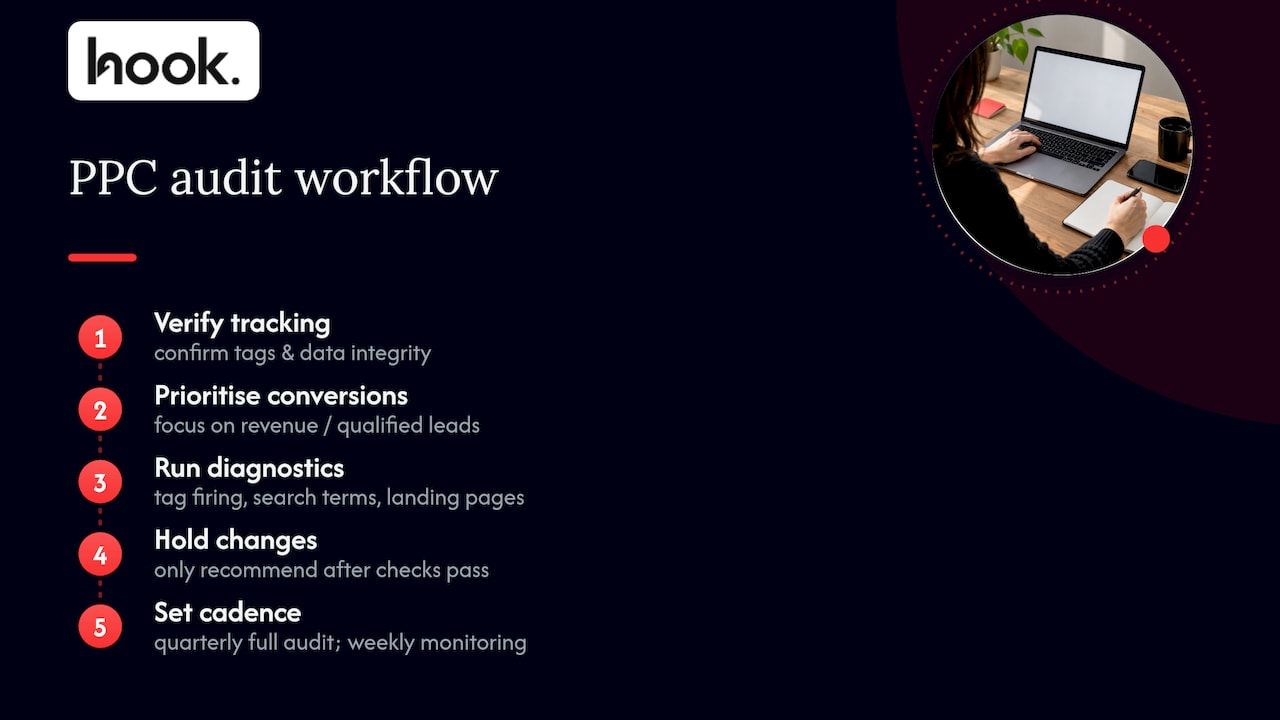
We start every audit the same way: verify tracking before touching anything else, because every other decision depends on that data being trustworthy. From there we prioritise conversions tied directly to revenue or qualified leads over vanity metrics, and we run the same diagnostic checks outlined above, including tag firing tests, search term exports and landing page reviews, before recommending a single change. We work to the same quarterly full audit and weekly monitoring cadence we have set out here, because accounts drift quietly between reviews if nobody is watching the small numbers.
Attribution models and the multi-channel picture
A single campaign rarely works alone. A customer might see a display ad, click a search ad two weeks later, and convert after a final branded search, and how you attribute credit across that path changes which campaigns look valuable.
Last-click attribution, still the default in many basic reports, gives all the credit to the final touchpoint and can make upper-funnel activity look worthless even when it is doing real work. Data-driven attribution, where available, spreads credit across the path based on actual conversion patterns rather than a fixed rule, which tends to give a fairer picture once you have enough conversion volume for it to be reliable.
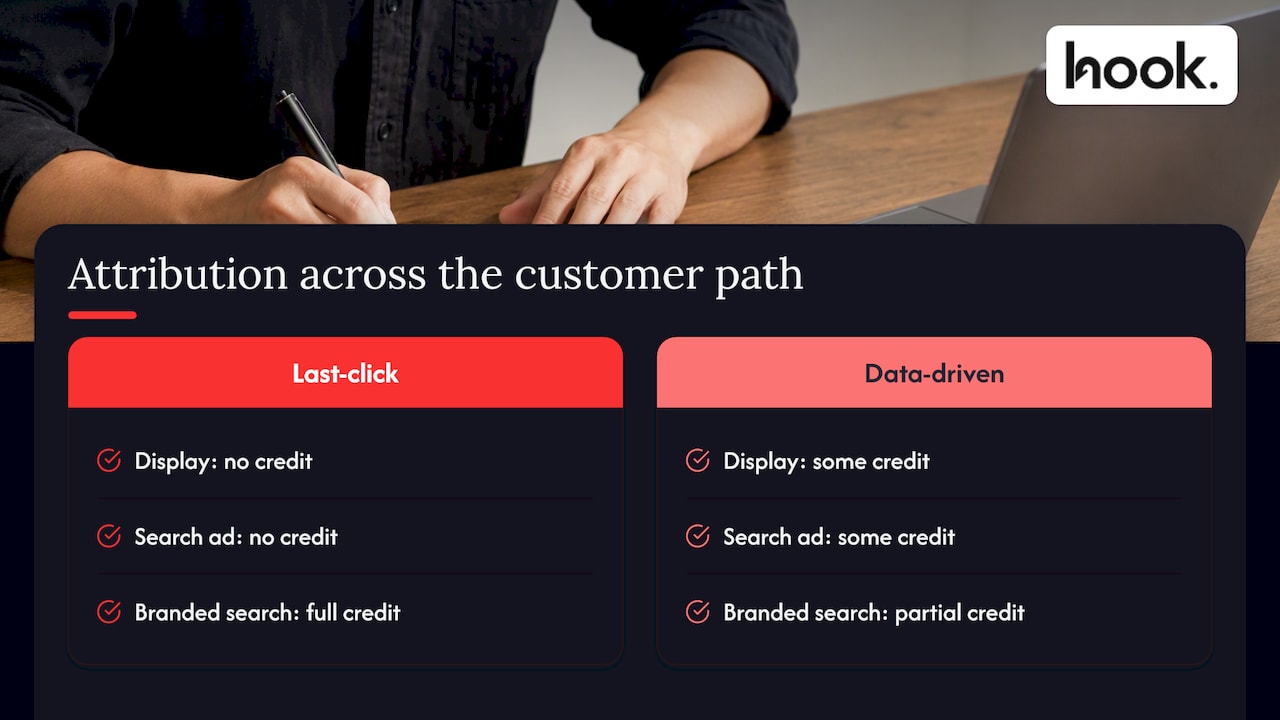
Check your conversion paths report before cutting any campaign that looks weak on a last-click basis; it may be quietly assisting conversions elsewhere in the account. If you run paid social alongside search, the same caution applies across channels, since a Facebook or Instagram ad might introduce a customer who converts later through a Google search for your brand name. Treating each channel as if it operates in isolation is one of the easiest ways to defund something that was actually working.
Fixing it yourself or bringing in help
Running this checklist in-house works well if you have the time, the access to every tool involved, and no urgent growth plans pulling your attention elsewhere. It becomes harder once your account spans multiple channels, your team lacks a dedicated person to own PPC, or you need results faster than a part-time effort allows.
If you do bring in an agency, ask for a clear scope, a realistic timeline, named deliverables and a reporting schedule before you sign anything. Vague promises of “ongoing optimisation” with no defined output are where scope creep usually begins.
— Hook
How Hook Digital can help with your PPC audit and fixes
If this checklist has turned up more work than your week has hours for, we can take it from here. We run PPC audits, prioritise the fixes into a dated action list, and implement the changes ourselves rather than just handing you a report to action alone.

- We verify tracking, tags and consent setup before touching bids or creative.
- We deliver a prioritised, dated action list with owners and verification steps built in.
- We implement approved fixes and report back on what changed and why.
Because PPC sits alongside branding, websites, SEO and creative work under one roof, a landing page issue your audit uncovers does not mean briefing a second agency from scratch. Get in touch through our PPC and Google Ads management page to talk through what your account needs next.
FAQ
How do you prepare an audit checklist?
Start by listing every area that affects performance, tracking, structure, keywords, creative, landing pages and budgets, then order each item by impact and effort. Group items into quick wins, medium-effort fixes and longer structural work so you have a sequence to follow rather than a flat list.
What does PPC stand for in finance?
PPC stands for pay-per-click, an advertising model where you pay each time someone clicks your ad rather than paying a flat fee for exposure. It is a marketing and advertising term rather than a traditional finance one, though the costs it generates sit within a business’s marketing budget.
What not to say during an audit?
Avoid vague or defensive statements that assume a problem without evidence, such as claiming a campaign “just doesn’t work” without checking tracking first. Stick to what the data actually shows, and flag assumptions clearly as assumptions rather than presenting them as confirmed findings.
What are the 5 C’s of auditing?
Definitions vary depending on the field, and there is no single standard “5 C’s” framework specific to PPC auditing. In general business auditing, versions commonly include criteria, condition, cause, consequence and corrective action, used to structure a finding rather than to measure advertising performance specifically.
Sources
- Cookies and similar technologies | ICO
- Enhanced conversions for leads implementation checklist - Google Ads Help
.png)


